

Managing your personal health journey shouldn’t mean worrying about losing your valuable biometric history, which is why learning how to back up smart ring data is essential for long-term tracking. Whether you are switching phones, resetting your device, or simply archiving your sleep and cardiovascular trends, securing this information ensures your wellness journey remains uninterrupted. At Team Herz P1, we understand that your physiological insights are deeply personal, so we have created this definitive guide to help you safeguard every single data point with absolute confidence and security.
Built to Last. Save Up to 69% Today.
The Herz P1 Smart Ring tracks HRV, Sleep, Heart Rate & SpO2 around the clock. No subscriptions. No renewals. Ever.
In This Article
- Step-by-Step Security: A complete guide showing you how to export smart ring data and secure your local history.
- Biometric Deep-Dive: Exploring Photoplethysmography (PPG), sleep stages, and heart rate variability (HRV) integration.
- Smart Phone Switches: Critical instructions to save health metrics on phone switch procedures cleanly.
- Risk Elimination: How to sidestep subscription-trap fees and optimize data tracking comfortably.
How to Back Up Smart Ring Data Safely: A Step-by-Step Guide
Before beginning your backup process, make sure your mobile device is connected to a secure Wi-Fi network.
Ensure your smart ring has at least a fifty percent battery charge to prevent any unexpected shutdowns.
Keep your smart ring within close Bluetooth range of your smartphone throughout the synchronization process.
-
Step 1: Establish a Secure Connection and Run a Manual Synchronization
Before initiating any backup protocol, you must ensure your wearable device is actively paired with your smartphone.
Open the application on your device and navigate to the main status dashboard to confirm active connectivity.
If you encounter any connection issues, you can consult our detailed smart ring troubleshooting guide to quickly resolve them.
Once the ring is connected, perform a manual synchronization by pulling down on the main dashboard screen.
This force-sync retrieves all locally stored biometrics, including heart rate variability, sleep stages, and active calorie burn, transferring them from the ring’s internal memory to your phone’s local storage database.
Do not close the application or turn off Bluetooth until the sync progress bar reaches one hundred percent completion.
This local synchronization guarantees that the most recent hours of your health tracking are securely saved on your handset.
-
Step 2: Access the Cloud Backup Settings Within the Application
After ensuring your local data is fresh, navigate to the settings menu located in the top-right corner of your interface.
Look for the account management or data privacy sub-menu, which governs your cloud storage preferences.
Understanding this menu is highly beneficial during your initial smart ring account setup phase.
Inside this sub-menu, locate the option labeled cloud synchronization or automatic backup.
Enable this feature to allow the software to automatically upload your synchronized health profiles to a secure, encrypted cloud server.
By enabling this auto-backup, you protect your history from being permanently deleted if your phone is lost or damaged.
Most modern health tracking platforms utilize military-grade encryption standards to secure your biometric files in transit and at rest.
Taking the time to verify these settings will ensure your data remains safely backed up without requiring manual intervention.
-
Step 3: Manually Export Your Raw Biometric Data File
For those who prefer a physical backup copy on their computer, exporting raw files is the absolute gold standard.
Navigate to the history or data export section of your application to find individual export options.
You will typically be presented with choices to export your data in either CSV or JSON formats.
CSV files are highly recommended because you can easily open them in Microsoft Excel or Google Sheets.
Select the specific date range you wish to archive, such as the past month, the past year, or your entire history.
Once you tap the export button, the application will compile your metrics into a single downloadable document.
Save this file directly to your phone’s local documents folder, or email it to yourself for secondary storage.
Having a physical copy of your heart rate and sleep trends protects you against any unforeseen cloud server outages.
-
Step 4: Prepare the System to Save Health Metrics on Phone Switch
When you purchase a new smartphone, transferring your health data seamlessly requires strategic preparation.
Do not uninstall the app from your old device or factory reset it until you verify the transfer process.
Learn the exact methods to transfer smart ring data to new phone to prevent complete database wipes.
Ensure both your old and new phones are logged into the exact same user account credentials.
Download the companion software on your new phone and verify that your profile loads successfully.
If you find your historical charts are blank on the new device, trigger a fresh cloud restore from the settings menu.
Only when you see your entire history populated on the new handset should you proceed to retire the old phone.
This dual-device verification prevents accidental data losses that frequently occur during hurried phone migrations.
-
Step 5: Verify Your Automated Local Device Backup Routines
In addition to in-app cloud backups, your smartphone’s system-level backup plays a crucial role in data security.
If you are an iPhone user, make sure that iCloud Backup is enabled for your health application.
For Android users, verify that Google Drive is set to back up your application data automatically.
These system-level backups capture local app databases that might not be synced to the brand’s proprietary servers.
Regularly checking your phone’s main backup settings ensures that this safety net remains fully operational.
If you ever need to perform a complete system recovery, this system backup will restore your application state.
This is incredibly helpful when you need to reset smart ring account settings without losing local trends.
Taking these secondary precautions provides an unbeatable multi-layered defense for your invaluable biometric history.
Your long-term physiological trends deserve the same level of backup security as your personal photos and business documents.
At Team Herz P1, we believe that managing your personal health data should be simple and secure.
The Herz P1 Smart Ring features an advanced automatic synchronization mechanism that backs up your biometric markers every time you open the app.
Our secure companion application integrates seamlessly with both iCloud and Google Drive to protect your sleep metrics, HRV scores, and physical activity logs without any extra effort on your part.
Best of all, you get full access to these premium backup features with zero monthly subscription fees, ensuring your data is always yours to keep forever.
The Science of Biometric Data Capture: Photoplethysmography and Cloud Database Integrity

To understand the importance of secure backups, we must first examine how smart rings capture physiological data.
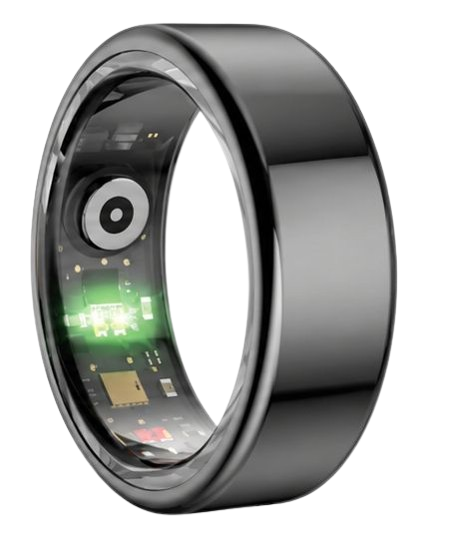
Most modern smart rings utilize Photoplethysmography, which involves emitting light into the skin to measure changes in blood volume.
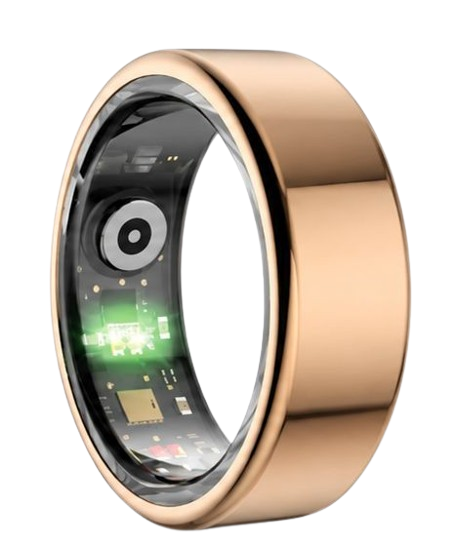
The Herz P1 Smart Ring utilizes multiple wavelengths of light, including green, red, and infrared LEDs, to capture highly accurate cardiovascular metrics.
The National Sleep Foundation emphasizes that continuous physiological tracking at the finger base provides superior signal quality compared to wrist-based wearables.
This superior accuracy is due to the dense network of arterial capillaries located in our fingers.
The raw signals captured by these optical sensors are processed locally on the ring’s microchip before being synchronized with your mobile application.
Once on your phone, these metrics are converted into structured databases detailing your Heart Rate Variability and oxygen levels.
If this local database is not backed up safely, a single software glitch or physical phone loss can erase months of trends.
Our cloud database architecture is designed to prevent this by establishing a real-time, encrypted mirror of your local app storage.
This ensures that every heartbeat, breath, and movement captured by your optical sensors is safely preserved for clinical-grade trend analysis.
Safeguarding this continuous stream of health metrics allows you to monitor long-term cardiovascular recovery patterns with absolute precision.
When you set up smart ring databases correctly, you establish a solid foundation for lifelong proactive wellness tracking.
Heart Rate Variability and Sleep Architecture: Managing Highly Sensitive Health Markers
Heart Rate Variability, or HRV, is one of the most sensitive indicators of autonomic nervous system stress.
The American Heart Association notes that tracking fluctuations in your resting heart rate can signal early onset of physical fatigue or illness.
Similarly, blood oxygen saturation, measured via SpO2 sensors, is a critical metric for assessing overnight respiratory health.
During deep sleep and REM cycles, your body undergoes vital physical and cognitive restoration.
Your smart ring tracks these complex sleep stages by analyzing subtle shifts in your movement and cardiac patterns.
This continuous biometric stream generates highly detailed profiles that reflect your daily recovery and stress tolerance.
Because this data is incredibly dense, losing it means losing a highly personalized map of your physical health.
When you successfully pair smart ring sensors to your phone, they begin logging these complex datasets immediately.
Ensuring this delicate architecture is regularly backed up protects your health history from accidental deletions.
Our secure synchronization protocol makes it incredibly simple to save and export these highly sensitive physiological trends.
This gives you the freedom to share your detailed recovery reports directly with your healthcare provider during checkups.
By taking proactive steps to manage your biometric records, you assume full control over your long-term health journey.
Secure storage of these vital signs transforms raw daily numbers into a powerful tool for preventive medical insight.
Practical Application Guide: Leveraging Biometric Exports for Daily Wellness
Once you understand how to safely manage your smart ring backups, you can begin applying this data to your lifestyle.
The Herz P1 App allows you to easily view, analyze, and export your historical health trends over any chosen timeframe.
For instance, tracking your HRV trends over a thirty-day period can reveal how work stress affects your recovery.
If you notice your average overnight HRV declining, it may be time to prioritize rest and adjust your exercise intensity.
Similarly, analyzing your deep sleep trends can help you optimize your evening routine for better physical restoration.
Many users find that exporting their sleep history into CSV files helps them identify specific lifestyle triggers that disrupt rest.
You can easily cross-reference your alcohol intake, late-night meals, or screen time against your sleep quality metrics.
The lightweight design of our military-grade steel ring makes it incredibly comfortable for continuous twenty-four-seven wear.
This continuous wear ensures there are never any gaps in your sleep or daytime physical activity records.
A fully backed-up history allows you to observe how positive lifestyle changes compound over months and years.
Your journey toward peak physical well-being relies on having consistent, accurate, and secure biometric data at your fingertips.
With the reliable Herz P1 app, you have the ultimate companion to guide your proactive daily recovery choices safely.
Overcoming Wearable Security Risks and Common Sizing Mistakes
Many individuals make the mistake of wearing bulky, uncomfortable smartwatches to bed to track their sleep quality.
These heavy devices often cause physical discomfort, leading to interrupted sleep and highly inaccurate biometric readings.
Additionally, several premium smart rings on the market lock your health data behind costly monthly app subscriptions.
At Team Herz P1, we believe that your personal health metrics should never be held hostage by ongoing fees.
The smart ring app provided by Herz P1 is completely free for a lifetime, providing full access to all your raw data backups.
Another common mistake is neglecting to verify the Bluetooth pairing status before assuming a backup has completed.
If you experience synchronization issues, you can easily fix wearable pairing issues by restarting your mobile Bluetooth.
Furthermore, some users mistakenly perform a factory reset on their phone before verifying their cloud synchronization settings.
Always double-check your account credentials and run a manual sync prior to executing any phone-level resets.
By avoiding these common pitfalls, you ensure a smooth, worry-free experience with your biometric tracking device.
Protecting both your physical comfort and your digital history is our top priority at Team Herz P1.
We design our hardware and software to operate in perfect harmony, keeping your personal health records highly secure.
With a reliable backup strategy, you can confidently explore all the advanced capabilities of your health-tracking wearable.
Frequently Asked Questions About Smart Ring Data Backups
Is the Herz P1 Smart Ring waterproof enough for daily swimming?
Yes, the Herz P1 features a certified IP68 waterproof rating, making it completely safe for all daily water activities.
It can withstand continuous submersion in water up to one hundred and sixty-four feet deep.
This means you can comfortably wear it while swimming, showering, washing your hands, or relaxing in a hot sauna.
The durable military-grade steel outer shell prevents any water from entering the internal sensor compartment.
You never have to worry about removing your ring before jumping into the pool or starting a workout.
How long does the battery last, and how fast does it charge?
The Herz P1 Smart Ring provides an impressive six days of continuous battery life on a single charge.
It utilizes an ultra-efficient chipset and advanced power-saving protocols to monitor your health day and night.
When it is time to recharge, the ring goes from zero to one hundred percent in under one hour.
We recommend placing the ring on its magnetic charger while you take a quick morning shower.
This simple charging habit ensures that you never miss a single minute of your overnight sleep tracking.
Which finger is best to wear the smart ring on for maximum accuracy?
For the most accurate biometric readings, we highly recommend wearing the ring on your index finger.
The index finger typically has the most robust blood flow, providing a stronger signal for the optical sensors.
Alternatively, the middle or ring fingers of your non-dominant hand are excellent secondary options.
Ensure the optical sensor bumps on the inside of the ring rest comfortably against the palm side of your finger.
A snug but comfortable fit guarantees that the Photoplethysmography sensors maintain constant skin contact.
Does the Herz P1 store health data offline when my phone is away?
Yes, the Herz P1 has built-in offline storage capable of saving up to seven days of biometric data.
If you go on a short trip without your smartphone, the ring continues to track your sleep and heart rate.
Once you open the application within Bluetooth range, all stored offline metrics will automatically synchronize to your phone.
This ensures that you never lose important recovery indicators even during extended periods of offline wear.
Your history is always secure, giving you peace of mind during outdoor adventures and unplugged weekend getaways.
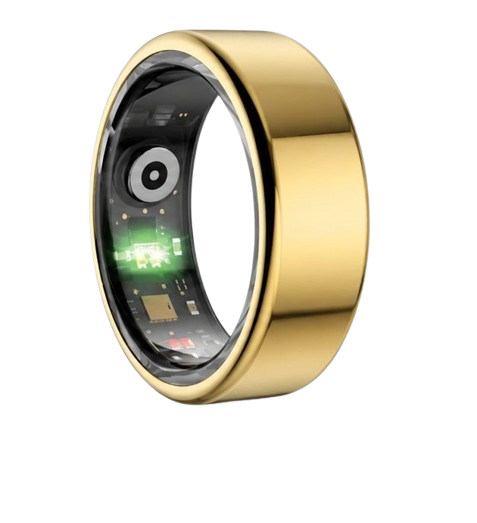
90-Day 100% Money-Back Guarantee
“The Herz Smart Ring helps me manage stress easily. It’s accurate, stylish, and lightweight—perfect for my busy life!”
— Jennifer P. | ✔ Verified Customer
- ✓ 6-Day Battery Life
- ✓ Detailed Sleep Analysis
- ✓ Fast 1-Hour Charging
- ✓ iOS & Android Ready
Questions? Call: 1-866-479-1629
Conclusion
Safeguarding your physiological data allows you to track recovery with complete confidence.
Ready to monitor your health every day? Explore the Herz P1 Smart Ring and see if it fits your lifestyle. Call: 1-866-479-1629 — our team can help you advise on the correct ring size and set personalized health goals.
