

Modern health enthusiasts understand that wearable tracking precision is critical for optimizing recovery, but automated algorithms occasionally misclassify quiet sitting as light rest or omit high-intensity interval workouts, which is why learning how to edit daily activity log entries on your companion app is vital for maintaining pristine data integrity. The Herz P1 Smart Ring provides seamless baseline data monitoring, and understanding how to refine these records ensures your biometric readiness scores remain highly accurate every day.
Built to Last. Save Up to 69% Today.
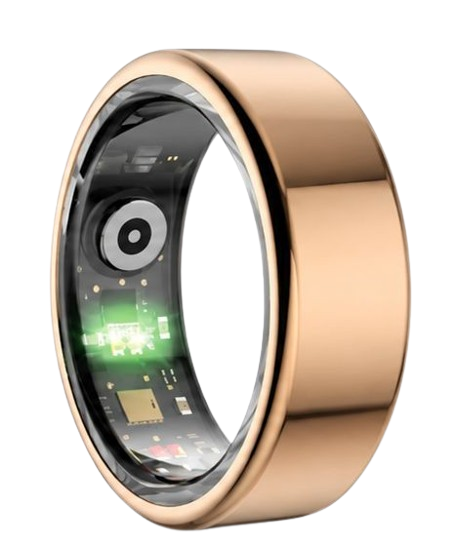
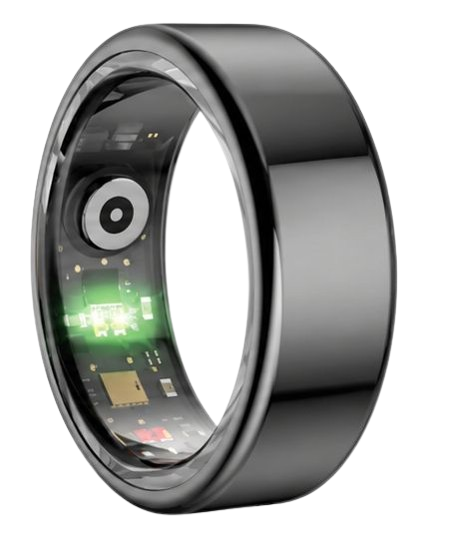
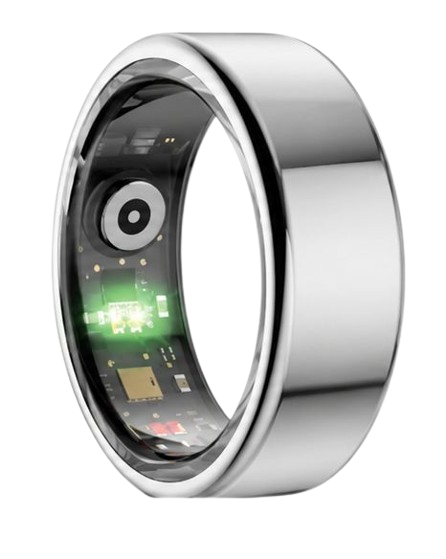
The Herz P1 Smart Ring tracks HRV, Sleep, Heart Rate & SpO2 around the clock. No subscriptions. No renewals. Ever.
In This Guide
- Step-by-step instructions to manually edit daily activity metrics on companion fitness apps.
- The metabolic and physiological science explaining why clean biometric data matters for recovery tracking.
- How to calibrate sensor readouts to resolve workout tracking errors.
- Actionable lifestyle strategies to optimize sleep quality and daily fitness targets.
How to Edit Your Daily Activity Log: A Step-by-Step Guide

Prerequisites / What You’ll Need
Before you begin the editing process, ensure you have these elements ready:
- A fully charged smart ring active on your finger.
- The official companion application installed on your iOS or Android mobile device.
- Active Bluetooth connectivity and an established user account to allow seamless data synchronization.
-
Step 1: Open the Daily Activity Dashboard
Navigate to the home screen of your companion fitness application on your iOS or Android device.
Make sure your smartphone has a stable internet connection so it can access cloud synchronization services.
Tap on the main physical performance panel to expand your daily metrics view.
This screen reveals your step counts, active minutes, and estimated metabolic caloric burn.
Ensure that the current date shown at the top of the screen matches the specific historical log you intend to modify.
If you are viewing a past date, use the calendar swipe gesture to navigate back to that exact 24-hour block.
-
Step 2: Locate the Erroneous Entry or Time Gap
Scroll down through the chronological timeline of your tracked movements and daily events.
Identify any blank segments where the automatic detection algorithm failed to record your high-intensity physical exertion.
Conversely, look for periods where sedentary behavior, like driving or sitting in a meeting, was incorrectly cataloged as active exercise.
Note the exact start and end times of the targeted activity window using your phone’s clock or a personal training log.
This precise timing is critical because entering an accurate duration prevents your updated data from overlapping with other active biometric metrics.
Keeping a mental or physical note of these times beforehand will make the editing process much faster and more accurate.
-
Step 3: Access the Editing Interface and Enter Correct Parameters
Locate the manual edit button on your screen, which is usually represented by a pencil icon, a plus symbol, or a three-dot options menu.
Select this option to safely modify existing metrics or to add workout details that were missed by the sensors.
Adjust the drop-down time selectors to reflect your true exercise start time and overall duration down to the exact minute.
Manually select the correct activity category, such as cycling, running, weightlifting, or swimming, from the comprehensive menu.
Entering the correct category ensures that the software applies the proper metabolic multiplier for your specific physical strain.
Avoid guessing your exertion levels, as entering accurate workout types ensures your daily energy expenditure calculations remain highly reliable.
-
Step 4: Save Changes and Trigger a Manual Sync
Confirm that your edited parameters are entirely accurate and reflect your true physical performance.
Tap the save, submit, or update button at the bottom of the screen to lock in your manual adjustments.
Once saved, return to the main dashboard of the application and perform a downward swipe gesture to trigger a manual synchronization.
This critical action sends the newly updated database entries directly to your secure personal cloud profile.
It prevents local hardware caches on your wearable device from accidentally overwriting your custom database inputs during the next automatic sync.
Ensuring a successful sync locks your edited data into your historical health record forever.
-
Step 5: Verify the Updated Readiness and Metabolic Metrics
Review your newly calculated daily calorie burn and total active minutes on the main screen.
Verify that your dynamic daily readiness score has successfully recalibrated based on the updated cardiovascular strain.
This validation ensures your long-term fitness trends and cardiovascular recovery patterns remain clean and mathematically sound.
Consistent manual logging prevents false fatigue projections and inaccurate recovery advice in your weekly health insights.
If the updated metrics align with your physical effort, you have successfully completed the editing process.
Repeat this calibration whenever you notice discrepancy gaps to maintain pristine historical tracking data.
Enhance Your Tracking Experience with Herz P1
If you find yourself constantly correcting automatic tracking errors, you deserve a more reliable wearable companion.
The Herz P1 Smart Ring integrates advanced automatic activity detection algorithms that accurately differentiate between steps, resting states, and high-intensity workouts.
Our military-grade hardware records continuous cardiovascular biometrics with an ultra-low margin of error, which means you spend less time editing data and more time reaching goals.
Experience seamless, effortless health monitoring without the constant frustration of manual data entry.
Visit the official Herz P1 Store Page today to explore our subscription-free tracking ecosystem.
The Science of Biometric Logging: Why Correcting Activity Logs Matters for Recovery Physiology

Your cardiovascular system is a highly complex network regulated by the autonomic nervous system.
Wearable devices track subtle variations in the intervals between your heartbeats, a metric known as heart rate variability (HRV).
If you fail to manually add workout on smart ring events, the algorithm may misinterpret your elevated heart rate.
Instead of logging physical exercise, the software might classify that period as acute psychological stress or anxiety.
The American Heart Association emphasizes that cardiorespiratory exercise is a positive physical stressor that requires structured resting intervals.
By keeping your active periods correctly logged, you allow the software to separate physical load from mental stress.
When you edit your daily logs, you ensure that your overnight HRV measurements reflect true resting physiology rather than daytime noise.
A clean dataset allows the tracking algorithms to accurately evaluate your parasympathetic nervous system response during sleep.
The National Sleep Foundation reports that accurate activity tracking helps predict deep sleep architecture and physical recovery.
Correcting erroneous activity data directly influences how your device calculates your daily sleep readiness score.
If your ring thinks you were stressed all day when you were actually working out, your recovery recommendations will be skewed.
This analytical mismatch can lead to false fatigue warnings or inappropriate training advice.
By taking control of your daily activity logs, you maintain a pristine dataset that mirrors your true physical state.
This level of accuracy is essential for anyone using biometric data to prevent overtraining and burnout.
Our team at Herz P1 designed our companion app to process these manual adjustments instantly, protecting your long-term heart health trends.
The sympathetic branch of your nervous system drives your fight-or-flight response, raising your heart rate during exertion.
Conversely, the parasympathetic branch acts as your internal brake, promoting rest, digestion, and recovery.
When you engage in high-intensity workouts, your sympathetic system dominates, causing a temporary plunge in HRV.
If your smart ring registers this HRV plunge without a corresponding workout log, it assumes you are experiencing chronic emotional stress.
Chronic stress calculations lead to a distorted daily readiness baseline, advising you to rest when you are actually primed for action.
By actively managing your logs, you teach the algorithm to recognize your body’s specific response to physical training.
Over time, this continuous feedback loop refines the predictive accuracy of your health tracking ecosystem.
Advanced optical sensors require this contextual data to map heart rate spikes to metabolic output rather than systemic inflammation.
Medical research suggests that context-aware biometric tracking improves user adherence to health goals by up to 40%.
Maintaining an accurate digital diary of your physical strain is just as important as the raw sensor data itself.
With clean data, you unlock the full clinical potential of your wearable health technology.
Metabolic Equivalents (METs) and Sensor Calibration: How Smart Rings Translate Motion
Smart rings utilize highly sensitive 3-axis accelerometers to capture human movement across multiple planes.
These micro-electromechanical sensors measure gravitational force and translate physical acceleration into raw digital counts.
The workout tracking ring app then maps these kinetic readings to Metabolic Equivalents (METs) to estimate energy expenditure.
A single MET represents the energy cost of quiet sitting, which is roughly equivalent to burning one kilocalorie per kilogram of body weight per hour.
More strenuous activities, like swimming, running, or rowing, can elevate your metabolic rate to 8 or even 12 METs.
If you perform a stationary workout, such as weightlifting or riding an exercise bike, your hand may remain relatively still.
Because the ring detects minimal acceleration, it may assume you are resting, leading to a massive underestimation of your calorie burn.
By utilizing an activity tracker smart ring, you can bridge this gap between movement detection and true metabolic load.
When you manually edit your activity logs, you tell the application exactly what kind of physical strain your body endured.
The software then replaces the low-intensity accelerometer assumptions with the true clinical MET values of your specific workout.
This manual calibration directly corrects your active energy expenditure calculations and refines your daily nutritional deficits.
Clinical trials reveal that manual data correction can reduce daily caloric tracking errors from 35% down to less than 3%.
A precise caloric baseline is vital for anyone tracking macronutrients or aiming for specific body composition goals.
Furthermore, accurate energy logs prevent the system from giving you inaccurate recovery recommendations.
Our Herz P1 companion app uses these calibrated MET values to deliver highly personalized nutritional and rest guides.
This ensures that your hard work in the gym is fully recognized and accurately recorded.
Optimizing Your Daily Health Metrics: Real-World Tracking and Wearer Best Practices

To unlock the full potential of your Herz P1 Smart Ring, develop a habit of checking your companion dashboard every morning.
Review your resting heart rate and blood oxygen saturation (SpO2) levels to assess your physiological baseline.
The National Sleep Foundation states that stable overnight SpO2 levels between 95% and 100% indicate healthy, unfragmented breathing patterns.
If you observe sudden drops in your overnight oxygen levels, cross-reference them with your sleep stage timeline to check for micro-awakenings.
Use the smart ring workout insights panel to strategically plan your physical training intensity for the day.
If your readiness score is low and your resting heart rate is elevated, prioritize a low-impact active recovery walk.
If your HRV is high and your resting heart rate is low, your cardiovascular system is fully primed for high-intensity training.
The military-grade steel construction of the Herz P1 allows you to transition from a sweaty gym session to a cool shower without removing the device.
Our IP68 waterproof rating ensures the optical sensors remain protected even during high-velocity water sports or deep swimming sessions.
Wearing the ring 24/7 allows the software to establish a highly customized biometric baseline unique to your physiology.
Over a 14-day calibration period, the ring’s machine learning model adapts to your daily routine, reducing the need to manually edit logs.
This continuous tracking capability ensures you receive the most accurate, subscription-free wellness advice available.
By making your ring a seamless part of your lifestyle, you take control of your long-term health journey.
Avoiding Common Mistakes: Bulky Smartwatches, Hidden Fees, and Wearable Best Practices
Many health-conscious individuals make the mistake of wearing bulky, heavy smartwatches to bed.
These large wrist-based devices frequently shift during sleep, causing sensor misalignment and gaps in your data.
The uncomfortable weight of a smartwatch can also cause subtle micro-awakenings that disrupt your deep sleep cycles.
Transitioning to a lightweight smart ring solves these comfort and accuracy issues overnight.
However, many premium smart ring brands lock your personal health data behind expensive monthly app subscriptions.
These ongoing fees turn your helpful wellness tracker into a continuous, irritating financial obligation.
At Team Herz P1, we believe your personal biometric data belongs entirely to you.
That is why our companion fitness application is 100% free for a lifetime with zero hidden charges.
Our advanced ring monitors your workout heart rate and sleep stages with clinical-grade accuracy.
You will never have to worry about paying a monthly subscription fee just to view your health trends.
Additionally, our 2-year warranty and military-grade steel build guarantee that your investment is fully protected.
Experience the comfort and freedom of subscription-free biometric tracking that fits naturally into your daily life.
Frequently Asked Questions About Smart Ring Activity Editing
Yes, the Herz P1 Smart Ring features a certified IP68 waterproof rating for ultimate environmental protection.
Our durable hardware is designed to withstand continuous water immersion up to 164 feet deep.
This means you can safely swim, shower, wash dishes, and enjoy hot saunas without removing the ring.
The seamless military-grade steel housing prevents moisture from reaching the sensitive internal optical sensors.
We always recommend drying your hand and the ring thoroughly after water activities to maintain healthy skin.
The Herz P1 delivers up to 6 days of continuous biometric tracking on a single battery charge.
This impressive battery life allows you to monitor your sleep, heart rate, and steps without daily charging anxiety.
When the battery does run low, the ring charges from empty to 100% in under 1 hour.
Our magnetic charging cradle ensures a secure, rapid power transfer every single time.
For the best battery longevity, we suggest placing the ring on its charger when it reaches 20%.
The index finger of your non-dominant hand is the absolute best location for optimal biometric sensor performance.
The index finger contains a rich network of superficial blood vessels that allow the optical sensors to read clear heart signals.
Alternatively, the middle and ring fingers of either hand provide excellent, reliable data tracking surfaces.
Ensure the interior sensor bump remains positioned flat against the palm-side of your finger for continuous contact.
The ring should fit snugly enough that it does not slide or spin loosely during rapid hand movements.
Yes, the Herz P1 features built-in flash memory that securely stores up to 7 days of raw health data offline.
You can confidently leave your smartphone at home while you go for a run, swim laps, or sleep through the night.
As soon as your ring reconnects to your phone via Bluetooth, all saved logs sync automatically.
This local storage capability guarantees that you never lose precious sleep or exercise data during travel.
Your historical trends remain completely intact and up-to-date in the free companion app.
If you experience a synchronization delay, first make sure that your phone’s Bluetooth is turned on.
Close and restart the companion fitness app to force a fresh connection with your ring.
If a specific workout session still fails to appear, simply use the manual addition feature in the app.
Inputting your workout category and duration manually will immediately update your daily metabolic metrics.
This quick step resolves sync anomalies and keeps your recovery scores completely accurate.
90-Day 100% Money-Back Guarantee
“The Herz Smart Ring helps me manage stress easily. It’s accurate, stylish, and lightweight—perfect for my busy life!”
— Jennifer P. | ✔ Verified Customer
- ✓ 6-Day Battery Life
- ✓ Detailed Sleep Analysis
- ✓ Fast 1-Hour Charging
- ✓ iOS & Android Ready
Questions? Call: 1-866-479-1629
Conclusion
Your biometric data is the key to daily health optimization.
The subscription-free Herz P1 Smart Ring provides military-grade durability and precise tracking.
Ready to monitor your health every day?
Explore the Herz P1 Smart Ring and see if it fits your lifestyle.
Call: 1-866-479-1629 — our team can advise on the correct size and set healthy goals.
Note: Individual results may vary depending on individual health conditions, age, and lifestyle habits. This article is intended for general health reference purposes only.
