

If you are planning to gift your wearable, start fresh with a clean profile, or hand your device down to a family member, knowing how to safely reset smart ring account settings and transfer hardware is essential for protecting your highly sensitive health biometrics. At Team Herz P1, we understand that your physiological data belongs strictly to you, which is why we have engineered a seamless process to clear stored health databases from your Herz P1 app without compromising hardware longevity. This complete tutorial will guide you through clearing cached algorithms, removing Bluetooth pairings, and preparing your military-grade tracking ring for its next successful pairing journey.
Built to Last. Save Up to 69% Today.
The Herz P1 Smart Ring tracks HRV, Sleep, Heart Rate & SpO2 around the clock. No subscriptions. No renewals. Ever.
In This Article
- Complete Hardware Reset: Find out exactly how to clean all localized storage and cache from your device safely.
- Seamless Profile Transfer: Master the secure handover sequence to pass your wearable to another person without exposing personal health metrics.
- Biometric Integrity: Understand why a pristine data calibration baseline is crucial for accurate heart rate variability and deep sleep tracking.
- Troubleshooting Connections: Learn fast fixes to resolve standard wireless communication and syncing errors between devices.
How to Reset Your Smart Ring Account and Transfer Your Ring: A Step-by-Step Guide
Prerequisites / What You’ll Need
Before you begin the reset process, gather all necessary tools and ensure optimal conditions.
You will need your mobile phone with active cellular data or a strong Wi-Fi connection.
Your tracking ring must sit in its dedicated charging cradle connected to a reliable power source.
Make sure you have your original account registration credentials handy for security verification checks.
-
Step 1: Sync Your Final Biometric Data
Open the companion application on your smartphone and perform a manual pull-down gesture on the primary dashboard screen.
This action forces all of your saved sleep history, physical activity logs, and cardiovascular metrics to upload directly to the cloud storage servers.
Wait until the synchronization progress bar shows that the upload is one hundred percent complete.
Skipping this step will lead to a permanent loss of your un-synced physiological historical progress.
If you are unsure if your device is fully synced, you can reference the official guide to set up smart ring settings for verification indicators.
-
Step 2: Erase Your Personal Biometric Profile
Open the settings menu within the application and select your registered user profile tab.
Scroll down to the privacy section to locate the option labeled “Factory Reset” or “Clear User Data.”
Tap this option and enter your password or biometric confirmation when prompted by your operating system.
This action initiates a complete command to scrub the localized storage chips on the wearable itself.
Using this function is highly recommended during a fresh smart ring account setup to avoid combining physical profiles.
-
Step 3: Unpair the Device From Your Phone
Navigate directly to the system settings menu on your smartphone and select the Bluetooth connection settings.
Locate the name of your smart ring under the list of paired active accessories.
Tap the information symbol next to the device name and select “Forget This Device” or “Unpair.”
This step severs the unique wireless handshake and encryption key established between the phone and the wearable.
This action is critical because if you do not do this, the ring will actively reject attempts to pair smart ring units to any secondary device.
-
Step 4: Execute a Hardware Force Reset
With the wearable resting in its powered charging dock, locate the physical reset pinhole or tactile sensor contact area.
Press and hold the reset contact for a minimum of fifteen seconds using a non-metallic tool.
Watch for the small LED indicator light on the charging dock to flash rapidly to confirm the reset command.
This physical reset clears the internal registers of the onboard processor and wipes the temporary active RAM cache.
Performing this step is an excellent way to fix wearable pairing issues that persist during software reboots.
-
Step 5: Safely Transfer the Ring to the New User
Clean the inner band of the smart ring with a soft microfiber cloth dipped in isopropyl alcohol.
This cleaning removes skin oils, sweat, and biological residue from the three raised photoplethysmography sensor pads.
Place the clean ring inside its original packaging alongside its dedicated charging dock and USB cable.
The new owner must download the companion application and start over with new account credentials using their personal email address.
You can share our expert article on how to set up your smart ring to help them navigate their initial connection smoothly.
If you are upgrading your setup, the Herz P1 Smart Ring provides a seamless, subscription-free ecosystem that simplifies device handovers.
Our intuitive application allows you to clear your data and transfer ring to new user quickly without any painful software activation fees.
Explore the simplicity of our ecosystem on the Herz P1 checkout page today.
The Biological Importance of Calibrating New Biometric Baselines

Photoplethysmography sensors work by projecting specific light wavelengths directly through the capillary beds of your finger.
The sensors detect the volumetric expansion of your blood vessels with every heartbeat.
Every single human body possesses a distinct vascular density, skin tone, and bone structure.
Our algorithms build a personalized calibration map over your first fourteen days of continuous wear.
This baseline allows the ring to detect subtle physiological changes with clinical-grade accuracy.
If you hand your device over to a friend without performing a reset, the software will attempt to read their biometrics using your historical data.
This results in highly inaccurate metrics, corrupted stress scores, and skewed sleep phase calculations.
According to research from the National Sleep Foundation, accurate sleep stage analysis relies heavily on precise baseline heart rates.
An uncleared profile can misidentify critical deep sleep cycles as light sleep or wakefulness.
This is why wiping the algorithmic database is vital for anyone who wants to start over with new account metrics.
Always perform a hard factory reset to ensure the next wearer receives accurate, personalized health trends.
Clearing Algorithmic Memory: Why Wearable Profile Isolation Matters
Your autonomic nervous system is regulated by two competing pathways: the sympathetic and parasympathetic networks.
These pathways are reflected in your heart rate variability, which measures the millisecond differences between heartbeats.
The American Heart Association notes that baseline heart rate variability is highly individual and correlates directly with stress levels.
A smart ring continuously calculates your personal daily stress index based on these micro-variations.
When you transfer your ring, the software must learn a brand-new user’s baseline from absolute zero.
This profile isolation prevents your historical cardiovascular trends from bleeding into the new user’s logs.
To prepare the hardware for this adaptation, you must also update ring firmware to the latest version.
The newest firmware updates contain advanced signal filtering parameters that make baseline calibration much faster.
This ensures the optical sensor array adapts immediately to the new wearer’s blood flow patterns.
Properly isolating profiles is the only way to maintain the scientific integrity of continuous biomarker tracking.
At Team Herz P1, we pride ourselves on protecting the analytical boundaries of every single user account.
Practical Application Guide: Maximizing Daily Health Tracking
Once you complete a transition, managing your daily biometric dashboard is straightforward.
The Herz P1 companion app displays your resting heart rate, SpO2 levels, and daily movement trends on one screen.
You can use this data to optimize your morning routines and adjust physical workout intensities.
If you are simply upgrading your mobile phone, you must transfer smart ring data to new phone targets without wiping your profile.
This is different from a factory reset because your account remains intact, preserving your historical progress.
Simply log into your existing account on the new phone and initiate a standard Bluetooth handshake.
The military-grade steel body of the Herz P1 is designed for comfortable, uninterrupted 24/7 wear.
This continuous wear allows the ring to capture vital recovery metrics while you sleep.
Pay close attention to your Deep Sleep and REM cycle metrics in the sleep architecture panel.
These stages are critical for physical restoration, muscle recovery, and cognitive memory consolidation.
Avoiding Wearable Security Hazards and Profile Errors
One common mistake is sharing a single user account between family members or partners.
Sharing an account overwrites your personal historical baselines, rendering the accumulated sleep data useless.
It also compromises your digital security, as multiple users can access sensitive health logs.
Another major trap in the wearable market is hidden, recurring monthly application subscriptions.
Many smart ring brands charge expensive ongoing monthly fees to view your biometric data.
With Team Herz P1, your companion application is completely free for life with no monthly paywalls.
If you encounter synchronization issues during account handovers, read our smart ring troubleshooting guide.
This guide provides fast solutions for clearing Bluetooth interference and resolving app connectivity lag.
By avoiding these common mistakes, you preserve the accuracy and security of your digital health tracking.
Technical Features and Competitor Comparison
Choosing the right wearable requires understanding how different brands handle data custody and ongoing costs.
The table below highlights how the Herz P1 compares directly with leading competitors in Q2 2025.
| Tracking Metric | Herz P1 Smart Ring | Standard Premium Competitors | Budget Wearables |
|---|---|---|---|
| Monthly Subscription Fee | $0.00 (Free App Forever) | $5.99 to $9.99 per month | Free (Limited Analytics) |
| Hardware Warranty | 2-Year Full Coverage | 1-Year Limited Warranty | 90-Day Warranty |
| Material Build | Military-Grade Steel | Standard Titanium Alloy | Plated Plastic / Aluminum |
| SpO2 Sensor Range | Continuous Monitoring (±2%) | Spot-check only | Inaccurate Estimate Only |
| Offline Data Storage | 7 Days Onboard Memory | 3 to 7 Days Memory | No Offline Storage |
Frequently Asked Questions (FAQ)
Yes, the Herz P1 features a certified IP68 waterproof rating.
It is fully protected against dust ingress and continuous water submersion up to 164 feet or 50 meters.
You can safely wear your smart ring while swimming, taking a shower, or washing your hands.
The Herz P1 battery lasts up to 6 full days on a single charge.
This is achieved through advanced low-energy Bluetooth chips and smart sensor power management.
It takes less than one hour to charge the battery from zero to one hundred percent using the magnetic dock.
We recommend wearing the smart ring on the index finger of your non-dominant hand.
This finger contains highly dense blood vessels close to the skin surface, providing optimal sensor signals.
The middle finger and ring finger are also excellent secondary choices if you prefer a different fit.
Yes, the Herz P1 has built-in flash memory that stores up to 7 days of biometric logs offline.
You do not need to keep your smartphone near you while you sleep or exercise.
The ring will automatically sync all stored metrics the next time it establishes a Bluetooth connection with your app.
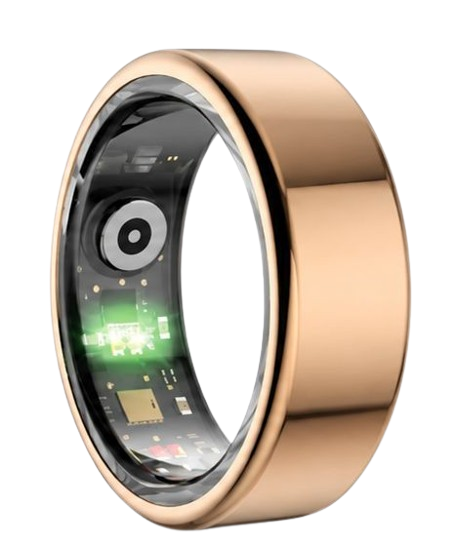
90-Day 100% Money-Back Guarantee
“The Herz Smart Ring helps me manage stress easily. It’s accurate, stylish, and lightweight—perfect for my busy life!”
— Jennifer P. | ✔ Verified Customer
- ✓ 6-Day Battery Life
- ✓ Detailed Sleep Analysis
- ✓ Fast 1-Hour Charging
- ✓ iOS & Android Ready
Questions? Call: 1-866-479-1629
Conclusion: Your Clean Slate Health Journey
Resetting your device safely protects your biometrics and ensures a seamless experience for the next user.
The Herz P1 remains a highly reliable wellness companion designed for continuous, precise health tracking without subscription traps.
Ready to monitor your health every day? Explore the Herz P1 Smart Ring and see if it fits your lifestyle. Call: 1-866-479-1629 — our team can help you advise on the correct ring size and set personalized health goals.
