

Upgrading your smartphone is exciting, but the fear of losing months of biometric history can make you hesitate to transfer smart ring data to new phone systems. At Team Herz P1, we know your sleep, heart rate variability, and oxygen trends are vital. Our subscription-free Herz P1 Smart Ring secures your metrics, ensuring a seamless, loss-free transition to your new device.
Built to Last. Save Up to 69% Today.
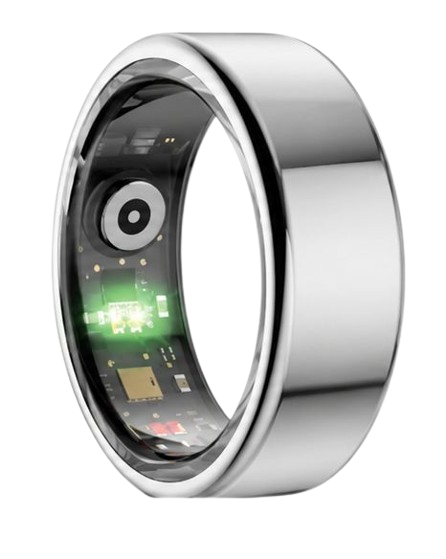
The Herz P1 Smart Ring tracks HRV, Sleep, Heart Rate & SpO2 around the clock. No subscriptions. No renewals. Ever.
In This Article
- Step-by-Step Data Migration: Master the secure protocols required to shift your biometric history without dropping a single day.
- Autonomic Nervous System Baseline Integrity: Discover why protecting your historical Heart Rate Variability (HRV) values prevents algorithm calibration errors.
- Bluetooth System Stack Troubleshooting: Learn how to resolve persistent wireless handshake conflicts between older peripheral connections and new mobile platforms.
- Proactive Lifestyle Optimization: Find out how to apply continuous biometric insights to improve your deep sleep architecture and occupational fatigue limits.
How to Transfer Smart Ring Data to a New Phone: A Step-by-Step Guide
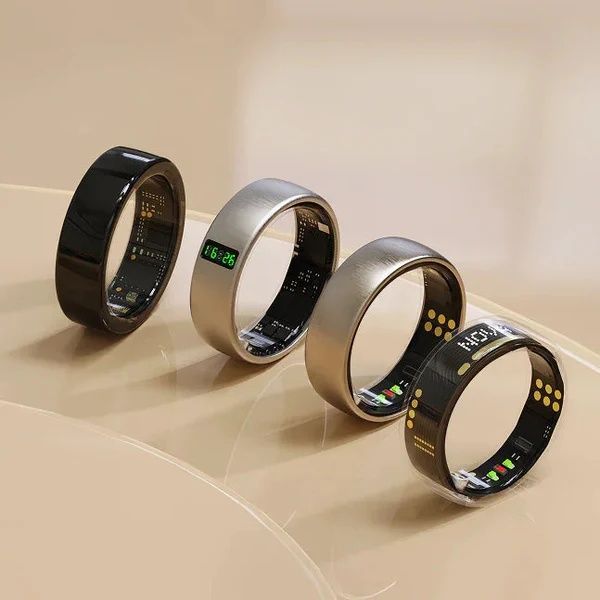
Migrating your personal health parameters between mobile devices requires careful attention to cloud synchronization details.
Before you begin, make sure your wearable ring contains at least a fifty percent battery charge to prevent a sudden power shutoff during transmission.
Keep both your old and new mobile devices close to each other with active Wi-Fi and Bluetooth connections enabled.
-
Step 1: Force a Manual Backup of Your Biometric Profile
Open your dedicated smart ring app on your current smartphone.
Locate the synchronization indicator on the main screen and pull down to trigger an immediate data transmission.
This process copies all local cached biometrics, including raw sleep stages and cardiovascular charts, up to your profile database.
Check the timestamp of the last successful synchronization in your account preferences to confirm that the server has fully saved your progress.
You can read more technical specifications on how to safely back up smart ring data to prevent accidental database wipes.
-
Step 2: Unpair the Peripheral Ring from Your Old Phone’s Bluetooth System
Open the Bluetooth device catalog inside the system settings of your old phone.
Select your smart ring’s identifier and choose the option to unpair or forget this peripheral entirely.
This step is critical because smart rings use low-energy chips that lock to one active host controller at a time.
If you keep the original bond active, the ring will silently reject any wireless scan attempts from your new smartphone.
Completing this step ensures that your wearable returns to its open advertising mode, ready for a new secure handshake.
-
Step 3: Retrieve Your Profile on the New Phone
Install the identical companion mobile application from your native application market onto your new phone.
Open the program and complete your smart ring account setup credentials exactly as they were configured previously.
Logging into your pre-existing profile is vital because creating a new account will orphan your historical health baseline metrics.
Once signed in, the program will contact the secure database to rebuild your long-term cardiovascular and wellness history.
-
Step 4: Execute the Wireless Bond and Connect the Ring
Place your smart ring securely on its native magnetic charging cradle to jumpstart its Bluetooth radio transmitter.
Navigate to the connection interface on your new phone and trigger a scan to locate your unique ring identifier.
Select your ring, accept the pairing prompt, and grant the application all requested permission rights for background operations.
If you encounter hardware discovery errors, learn how to pair smart ring channels successfully with our detailed network setup support.
You can also access our troubleshooting guide to fix wearable pairing issues when signal interference blocks the initial connection.
-
Step 5: Verify the Synchronized Baseline Metrics
Keep the application open for three to five minutes while it downloads your historical data from the secure cloud system.
Inspect your weekly sleep scores, daily stress graphs, and autonomic nervous system trends to make sure everything has populated.
If some fields look blank, perform a manual refresh by dragging down on the primary dashboard view.
If your graphs remain empty or the connection drops repeatedly, refer to our comprehensive smart ring troubleshooting guide to clear local system glitches.
At Team Herz P1, we designed the Herz P1 Smart Ring to make these transitions effortless.
Our subscription-free companion software archives your long-term biometric metrics in a secured cloud database forever at no extra cost.
This guarantees that when you transfer smart ring data to new phone interfaces, your continuous history remains intact.
The physical ring also contains seven days of local flash memory to protect your records if you are away from your phone during a move.
This ensures you never lose a single night of sleep tracking or recovery analysis during a smartphone transition.
Why Your Wearable Data Integrity Matters: The Science of Biometric Continuity

Biometric sensors do not merely display snapshot readings of your heart rate or skin temperature.
Instead, advanced algorithms analyze trends over weeks to establish your unique autonomic nervous system baseline.
Your Heart Rate Variability (HRV) is a highly personal metric that reflects physical recovery and neurological fatigue.
According to the American Heart Association, keeping an uninterrupted record of these metrics helps identify early markers of cardiovascular strain.
When you fail to properly transfer wearable data phone systems, the tracking software loses this crucial baseline.
The algorithm must then spend up to fourteen days recalibrating your body’s normal physiological ranges.
During this recalibration phase, your daily stress index and recovery recommendations will be highly inaccurate.
This is why keeping your historical data intact is critical for reliable daily health insights.
Continuous tracking is also vital for monitoring your blood oxygen saturation (SpO2) trends during sleep.
The National Sleep Foundation states that tracking long-term sleep architecture is the most reliable way to evaluate chronic sleep health.
By keeping a continuous history, your smart ring can spot subtle changes in your sleep efficiency over several months.
If you must reset smart ring account details during a transition, ensure you export your data first to protect your records.
Our Herz P1 smart ring prioritizes your data ownership by giving you full access to all your historical charts with zero subscription blocks.
Troubleshooting Bluetooth Protocol Conflicts During Smart Ring Migration
Bluetooth Low Energy operates on a sequence of secure hardware handshakes designed to preserve battery life.
When a smart ring is bonded to an old phone, its internal antenna actively ignores pairing requests from other devices.
This security protocol prevents unauthorized third parties from intercepting your health data in public spaces.
However, this security measure often causes connection errors when users attempt to pair with a new smartphone.
The smart ring may remain silently connected to the old phone if that device is within thirty feet.
To resolve this conflict, you must turn off the Bluetooth radio on your old phone entirely.
This forces the smart ring to enter its open advertising state, allowing the new device to discover its signal.
If the connection fails repeatedly, clearing your new phone’s Bluetooth network cache is an effective solution.
Android and iOS devices store peripheral pairing caches that can become corrupted during system updates.
Clearing this cache resets the wireless system stack, creating a clean slate for the new handshake.
If you encounter persistent wireless dropouts, follow our comprehensive guide to set up smart ring options safely on any operating system.
Our Herz P1 smart ring features an advanced Bluetooth 5.2 system that negotiates wireless handshakes faster than older standards.
This ensures that moving your physical device to a new phone is quick, secure, and hassle-free.
Optimizing Your Daily Health Strategy with the Herz P1 Application
Once you successfully link your ring to your new device, you can use your historical trends to optimize your lifestyle.
The Herz P1 app displays three primary scores each morning: Sleep, Recovery, and Stress.
Your Sleep Score is calculated by measuring light, deep, and REM sleep cycles alongside overnight heart rate variability.
If your deep sleep drops below fifteen percent of your total rest, focus on reducing blue light exposure before bed.
Your Recovery Score indicates how well your autonomic nervous system has rebounded from physical and mental strain.
A low HRV recovery score suggests you should prioritize restorative activities like yoga or light walking instead of intense workouts.
Meanwhile, the continuous Stress Index tracks your sympathetic nervous system activity throughout your workday.
If you notice a sudden spike in stress, take a five-minute deep-breathing break to activate your parasympathetic response.
The lightweight, sleek design of the Herz P1 allows you to wear it comfortably 24/7 without the skin irritation caused by bulky wristbands.
This constant wear guarantees a complete, uninterrupted stream of health metrics that reflect your true physical state.
Pitfalls to Avoid When Upgrading Your Smartphone Ecosystem
One common mistake is performing a hard factory reset on your old smartphone before verifying the backup status on your new device.
Always log in to the companion application on your new phone to confirm that your complete history is present before erasing the old one.
Another major trap in the wearable market is the hidden cost of ongoing monthly app subscriptions.
Many popular health trackers lock your historical data behind a premium paywall after a short trial period.
This means if you refuse to pay, you lose access to the very baseline trends you worked hard to build.
Team Herz P1 firmly believes that your health data belongs to you, which is why our application is free for life.
There are no subscription fees, no locked metrics, and no hidden charges to access your clinical-grade trends.
We also protect your physical investment with a comprehensive two-year warranty and military-grade steel construction.
This ensures your hardware is just as durable and reliable as your digital backup system.
Comparing Data Portability and Lifetime Costs
Choosing a smart ring is an investment in your long-term wellness strategy.
Below is a clear comparison of how the Herz P1 stacks up against industry standards in terms of data migration, warranty, and subscription models.
| Feature Comparison | Herz P1 Smart Ring | Typical Competitor Rings |
|---|---|---|
| Monthly Subscription Fee | $0 (Free App For Life) | $5.99 to $9.99 per month |
| Warranty Coverage | 2-Year Comprehensive Warranty | 1-Year Standard Warranty |
| Data Export & Transfer | Free Cloud Backup & Unlimited History | Often locked behind premium tier paywalls |
| Material Grade | Military-Grade Steel & Waterproof IP68 | Standard Titanium or Plastic Interior |
| Offline Flash Storage | 7 Days of Local Data Protection | 1 to 3 Days of Onboard Memory |
This comparison shows that our team prioritizes transparency, data protection, and robust value for all users.
Frequently Asked Questions About Smart Ring Migration
Is the Herz P1 smart ring waterproof?
Yes, the Herz P1 is fully certified with an IP68 waterproof rating.
This means it can be safely submerged in fresh water up to a depth of fifty meters or 164 feet.
You can comfortably wear your ring while swimming, taking a hot shower, washing your hands, or enjoying a sauna session.
Our military-grade steel exterior protects the delicate internal sensors from high-pressure water streams and sweat.
How long does the battery last on a single charge?
The high-performance lithium battery inside the Herz P1 lasts up to six days under normal usage patterns.
Normal usage includes continuous 24/7 heart rate monitoring, active sleep architecture analysis, and regular Bluetooth synchronization.
When the battery is fully depleted, it charges to one hundred percent in under one hour using the included rapid charger.
This rapid turnaround minimizes the amount of time your finger is left unmonitored during the day.
Which finger is best to wear my smart ring on for maximum accuracy?
We recommend wearing the smart ring on your index, middle, or ring finger for the most accurate physiological readings.
The index finger generally has the strongest pulse signal because of the prominent digital arteries near the surface of the skin.
Ensure the internal optical sensor bump is positioned on the palm side of your finger to maintain constant skin contact.
Avoid wearing the ring on your thumb or pinky finger, as these areas have lower perfusion rates and may cause inconsistent data.
Does the Herz P1 store my biometric data offline if my phone is disconnected?
Yes, the ring contains an onboard flash memory chip that safely stores up to seven days of continuous raw biological data offline.
If your phone runs out of battery or you travel without a network connection, your sleep stages and heart rate variability are still being logged.
Once you are back near your phone, the ring will sync all stored data chronologically the moment you open the mobile app.
This local backup prevents gaps in your health records during phone upgrades or unexpected wireless disconnects.
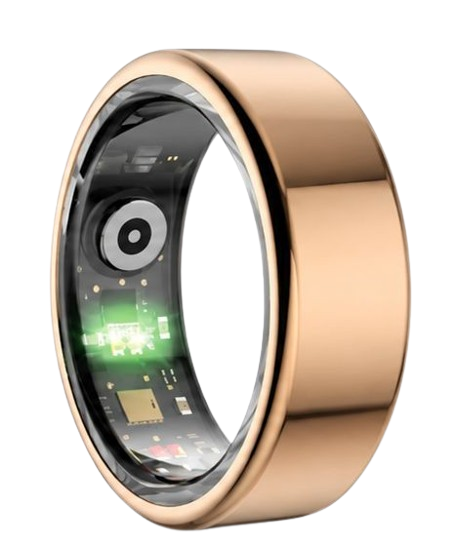
90-Day 100% Money-Back Guarantee
“The Herz Smart Ring helps me manage stress easily. It’s accurate, stylish, and lightweight—perfect for my busy life!”
— Jennifer P. | ✔ Verified Customer
- ✓ 6-Day Battery Life
- ✓ Detailed Sleep Analysis
- ✓ Fast 1-Hour Charging
- ✓ iOS & Android Ready
Questions? Call: 1-866-479-1629
Upgrading your phone should never threaten your historical health baseline.
The Herz P1 Smart Ring ensures your health tracking remains continuous, subscription-free, and secure.
Ready to monitor your health every day?
Explore the Herz P1 Smart Ring and see if it fits your lifestyle.
Call: 1-866-479-1629 — our team can help you advise on the correct ring size and set personalized health goals.
