

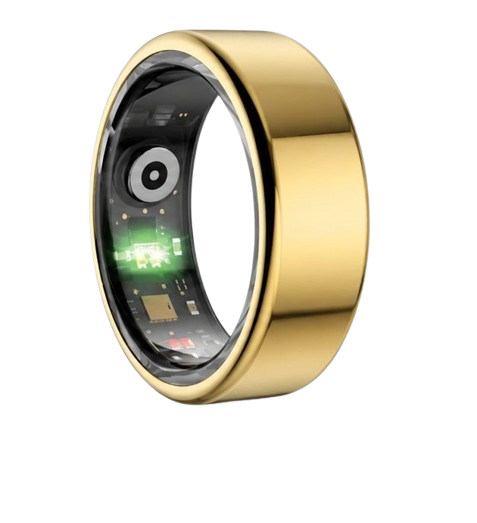
Many physical performance enthusiasts struggle with maintaining pristine biometrics when unpredictable schedules disrupt standard sleep algorithms, which is why knowing how to edit bedtime logs on your mobile health app is absolutely critical to your physiological recovery. At Team Herz P1, we designed our premium, military-grade Herz P1 smart ring to automate and decode raw sleep data with exceptional accuracy, ensuring that you can easily adjust incorrect resting windows when lifestyle variations arise so that your daytime recovery scores always remain exceptionally clean and precise.
Built to Last. Save Up to 69% Today.
The Herz P1 Smart Ring tracks HRV, Sleep, Heart Rate & SpO2 around the clock. No subscriptions. No renewals. Ever.
In This Article
- Discover step-by-step instructions on adjusting start and end resting times on your companion health app.
- Learn about sleep architecture and why accurate logs impact autonomic recovery metrics.
- Understand how to minimize data pollution to protect heart rate variability insights.
- Get answers to standard device concerns, from battery lifespans to waterproof capabilities.
How to Edit Bedtime and Wake Up Times on Your App: A Step-by-Step Guide

Prerequisites / What You’ll Need Before Starting
To ensure your manual data modifications write correctly to your permanent tracking profile, you need a few core elements prepared.
First, verify that your mobile smartphone is turned on and has active Bluetooth communication turned on.
Second, ensure your tracking ring is fully paired and has successfully uploaded its local data payload to the cloud.
Third, locate the exact times of your sleep cycles so you do not input incorrect values that mess up your historical records.
Finally, check that you have downloaded the latest software upgrade for your health companion app to avoid processing errors.
Step 1: Open Your App and Access the Daily Dashboard
First, tap the health tracking icon on your home screen to launch your personal companion application.
Wait for the primary display to complete its automated download process and refresh your current statistics.
Tap directly on the sleep card, which showcases your most recent resting totals and recovery score.
This action will launch your deeper analytical layout, where specific timelines are fully mapped out.
Step 2: Locate the Inaccurate Sleep Log Session
Next, swipe down through the dashboard until you find your chronological list of recent sleep sessions.
Tap on the specific date block containing the inaccurate sleep start or wake times you wish to fix.
Look closely at the screen to verify if the automated algorithm captured a block of wakefulness incorrectly.
This visual check helps you determine exactly how many minutes you need to prune from your logs.
Step 3: Modify Your Sleep Start and End Coordinates
To proceed, tap the edit option, which is usually represented by a pencil icon or three dots in the upper corner.
Tap the start time field first and utilize the scrolling dial wheel to set the exact minute you drifted off.
Once that is set, select the end time option and input the precise minute you became fully conscious and alert.
Ensure that you carefully review the AM and PM indicators to avoid creating major calculation errors.
Step 4: Save the Updated Log and Recalculate Your Score
After entering the correct values, tap the blue save or confirm button located at the base of the screen.
The application will pause briefly as its cloud algorithms recalculate your entire sleep architecture based on the new boundaries.
You will watch your deep sleep, light sleep, and REM sleep metrics adjust instantly to fit the new timeline.
This ensures your overall recovery score is based on true physiological resting states rather than waking periods.
Step 5: Force a Manual Sync with Your Tracking Ring
Finally, return to the main dashboard interface to ensure the new values lock into your historical archive.
Perform a manual pull-down gesture on the screen to force a direct sync with your smart wearable ring.
This action pushes the corrected variables to our encrypted servers and updates all weekly averages.
You can now close the program knowing your health monitoring history is perfectly accurate and updated.
Integrating Wearable Innovation to Minimize Manual Efforts
Our engineering group designed the Herz P1 Smart Ring to deliver an incredibly smooth data management experience.
The advanced multispectral sensors in our Herz P1 ring read your body signals every few seconds to automate sleep tracking.
But when you need to make quick manual updates, our companion software lets you edit bedtime settings in under ten seconds.
This simple process prevents data pollution and gives you total control over your personalized wellness journey.
The Biometric Science of Sleep Staging: Why Every Minute Counts

To understand why entering precise times is vital, we must explore the complex architecture of human rest.
The National Sleep Foundation states that a healthy adult requires multiple completed cycles of rest every single night.
Each cycle consists of essential stages including light rest, deep slow-wave rest, and rapid eye movement phases.
Your body utilizes deep slow-wave cycles to release growth hormones and repair cellular micro-tears in muscular tissue.
Conversely, rapid eye movement phases are critical for cognitive health, memory consolidation, and processing daily stress.
When you edit sleep hours smart ring parameters, you ensure these stages are mapped to correct physical states.
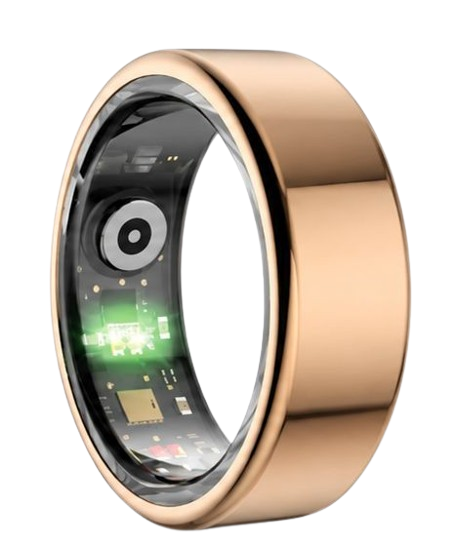
Our premium Herz P1 Smart Ring tracks these transitions using advanced photoplethysmography technology.
This optical tech shines green, red, and infrared light through your capillaries to measure changes in blood volume.
By correcting false logs, you allow our system to accurately measure your sleep frequency with elite accuracy.
This prevents wakeful moments of lying in bed from being misclassified as deep restorative rest.
Maintaining perfect accuracy is crucial for identifying your true sleep chronotype over a multi-month wear period.
When your chronotype is correctly identified, you can structure your work day to align with your natural biological clock.
Why Adjusting Your Bedtime Settings App Data Protects Autonomic Analytics
The American Heart Association emphasizes that heart rate variability is one of the most powerful markers of systemic recovery.
Heart rate variability, or HRV, measures the tiny, millisecond variations in time between each consecutive heartbeat.
A highly variable rhythm suggests that your parasympathetic nervous system is active and your body is fully recovered.
A rigid, low variability reading indicates that your sympathetic nervous system is dominant due to stress or fatigue.
The Herz P1 Smart Ring measures your personal HRV continuously throughout your nocturnal cycles to capture pure data.
If your sleep log contains extended periods where you were actually awake and worrying, your HRV readings will drop falsely.
This statistical pollution occurs because waking stress patterns are analyzed as if they occurred during peaceful rest.
By learning how to edit bedtime details, you prune these waking stressors from the database.
This clean pruning keeps your autonomic nervous system trends consistent and highly reliable over time.
Our military-grade hardware works in perfect harmony with these algorithms to deliver medical-grade insights without monthly fees.
We also track blood oxygen saturation, or SpO2, with an exceptionally low clinical margin of error under two percent.
This guarantees that oxygen tracking is highly reliable, providing warning signals of potential respiratory disruptions.
Optimizing Your Autonomic Balance and Circadian Rhythm Realities
Your body operates on an ancient internal clock that dictates hormone production, core temperature, and alertness levels.
This clock is highly sensitive to external cues such as sunlight, food intake, and physical activity timing.
When you establish a highly regular sleep wake cycle circadian rhythm, your physical energy levels skyrocket.
However, modern work schedules and social obligations frequently force us to deviate from our natural patterns.
This constant shift creates a form of physiological stress that degrades cellular function and slows athletic progression.
By monitoring these shifts on our free companion application, you can actively plan lifestyle corrections to protect your heart.
You can identify whether your natural body clock and chronotype is better suited for early mornings or late nights.
Our smart ring collects these vital biometrics continuously while requiring absolutely zero monthly subscription fees.
This allows you to access clinical-grade recovery tracking without worrying about recurring bills or hidden financial catches.
The result is a robust, data-informed lifestyle plan that keeps you performing at your absolute peak physical capacity.
Practical Application Guide: Transforming Sleep Logs into Lifestyle Mastery

Having clean data is only the first step on your path toward physical optimization.
To truly master your daily health, you must translate these corrected sleep metrics into targeted daily actions.
Open your Herz P1 app each morning and review your updated resting metrics first thing after waking up.
If you notice your deep sleep averages have fallen, prioritize recovery by reducing physical training intensity that day.
Use the tracking dashboard to establish a highly predictable weekly sleep schedule that you can stick to easily.
This consistent habit trains your endocrine system to release resting hormones at the exact same hour every night.
You can use this continuous data stream to pinpoint what is my ideal bedtime for maximum next-day cognitive performance.
Our lightweight ring is crafted with an ultra-slim design that fits comfortably on your finger twenty-four hours a day.
You will never experience the heavy, sweaty discomfort that bulky plastic smartwatches cause during warm summer nights.
The sleek, hypoallergenic inner lining prevents skin irritation and ensures seamless sensor contact even during intense training sessions.
This comfortable experience allows you to gather weeks of continuous, unbroken biometric trends without ever needing a break.
Overcoming Risks and Critical Pitfalls in Modern Wearable Technology
Many wellness seekers unknowingly damage their long-term progress by relying on massive, heavy smartwatches for health tracking.
These large wrist devices frequently slip and slide during sleep, creating huge gaps in sensor contact that corrupt data.
These tracking gaps often lead to missed cardiac warning signs or false records of overnight restlessness.
Furthermore, the short battery life of wrist wearables forces users to charge their devices overnight, losing critical metrics.
Another major risk is the industry trend of locking advanced sleep analytics behind expensive monthly subscription paywalls.
Several top brands charge you a continuous fee just to view your own heart rate and sleep stage breakdowns.
At Team Herz P1, we believe that your personal health data should always be completely free for you to access.
Our premium application is completely free for lifetime, with absolutely no monthly fees or hidden charges ever.
Additionally, keeping a clean log helps you identify the hidden dangers of experiencing social jetlag.
Social jetlag occurs when your weekend sleep habits differ drastically from your structured weekday work schedules.
This circadian mismatch confuses your cardiovascular system and leads to a persistent state of physical exhaustion.
By tracking your sleep windows and learning to adjust bedtime settings app parameters, you can easily counter these imbalances.
Frequently Asked Questions About Herz P1 Sleep Tracking
Is the Herz P1 smart ring fully waterproof?
Yes, the Herz P1 smart ring features a premium IP68 waterproof rating for maximum environmental protection.
This military-grade rating ensures the ring is completely protected against continuous submersion in water up to 164 feet deep.
You can confidently wear your ring while swimming laps, taking hot showers, or relaxing in steam saunas.
There is absolutely no need to remove the ring when washing your hands or washing dishes after dinner.
The seamless outer steel chassis keeps all delicate optical sensors perfectly sealed against moisture ingress.
How long does the battery last on a single charge cycle?
The Herz P1 smart ring is equipped with an ultra-compact battery that delivers up to six days of continuous tracking.
This long runtime means you do not have to worry about packing a charger for short weekend trips or business travel.
When you need to power up, our custom magnetic charging base restores a full charge in under one hour.
This rapid charging capability means you can quickly power up the ring while you complete your morning shower routine.
This ensures you never have to miss a single minute of valuable nocturnal biometric data gathering.
Which finger is best to wear the smart ring on for accurate tracking?
For the absolute highest degree of PPG sensor accuracy, we recommend wearing the ring on your index finger.
Your index finger has highly accessible blood vessels near the surface, allowing for exceptionally clean optical readings.
However, you can also wear the ring on your middle or ring finger with excellent physiological results.
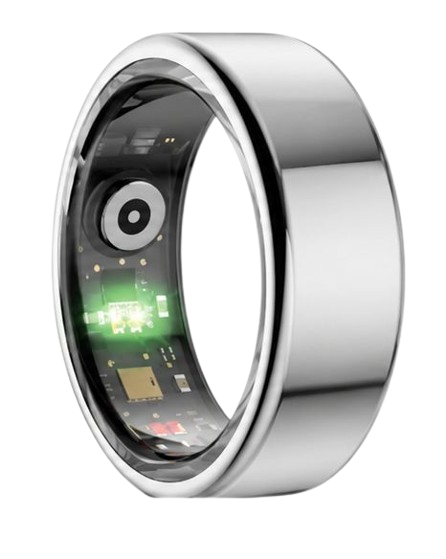
Ensure the three internal sensor nodes are resting flat against the underside palm area of your finger.
A secure, snug fit is key to preventing the ring from spinning during high-movement physical activities.
Does the smart ring store my biological data when my phone is offline?
Yes, the Herz P1 smart ring contains built-in storage that holds up to seven days of raw health data offline.
You do not need to keep your smartphone next to your bed or keep your Bluetooth connection active overnight.
The ring will securely record your sleep stages, HRV, and heart rates entirely on its local internal memory.
Once you turn your phone on and launch the companion app, all stored metrics sync instantly in the background.
This gives you total peace of mind and allows you to enjoy screen-free bedroom environments for better sleep.
90-Day 100% Money-Back Guarantee
“The Herz Smart Ring helps me manage stress easily. It’s accurate, stylish, and lightweight—perfect for my busy life!”
— Jennifer P. | ✔ Verified Customer
- ✓ 6-Day Battery Life
- ✓ Detailed Sleep Analysis
- ✓ Fast 1-Hour Charging
- ✓ iOS & Android Ready
Questions? Call: 1-866-479-1629
Conclusion: Your Subscription-Free Wellness Journey Starts Here
Elevating your daily sleep quality requires highly accurate biometric data that you can easily edit and analyze.
The premium Herz P1 Smart Ring delivers subscription-free wellness insights, military-grade materials, and unmatched comfort.
Ready to monitor your health every day?
Explore the Herz P1 Smart Ring and see if it fits your lifestyle.
Call: 1-866-479-1629 — our team can help you advise on the correct ring size and set personalized health goals.
Note: Individual results may vary depending on individual health conditions, age, and lifestyle habits. This article is intended for general health reference purposes only.
