

Tracking your physical fitness accurately can sometimes be a challenge when your wearable device fails to auto-detect a specific session, which is why learning how to manually add workout data on your companion application is a vital skill. The premium, subscription-free Herz P1 smart ring monitors your biometric indicators constantly, but manual logging ensures your active recovery profile remains mathematically flawless even when you leave your ring on the charger. In this comprehensive guide, our team will show you how to effortlessly input, modify, and master your fitness logs to preserve your physiological trends.
Built to Last. Save Up to 69% Today.
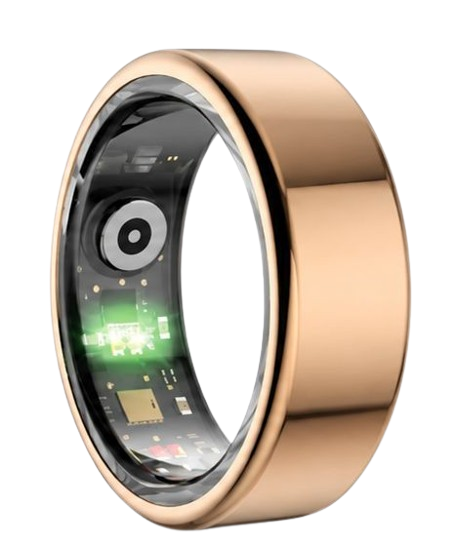
The Herz P1 Smart Ring tracks HRV, Sleep, Heart Rate & SpO2 around the clock. No subscriptions. No renewals. Ever.
In This Article
- Step-by-step instructions for inputting physical exercise sessions manually.
- The exact science behind cardiovascular metrics and metabolic calculations.
- Practical advice for decoding your daily heart rate fluctuations and stress markers.
- How to optimize your recovery profile using active metrics on your application.
- Pro tips for choosing the right wearing finger and maintaining waterproof safety.
How to Manually Add and Edit Workouts on Your App: A Step-by-Step Guide

Prerequisites / What You’ll Need
To successfully update your health records, make sure your smartphone has Bluetooth enabled.
Confirm that your smart ring has paired with your mobile app to synchronize previous background tracking data.
Verify that your phone has a stable internet connection to back up your metrics safely to the cloud.
Keep your rough exercise start and finish times written down so you can enter them with precision.
Step 1: Access the Main Dashboard Screen
Launch your companion health application on your mobile device.
Locate the daily progress summary page that features your metabolic data and movement indicators.
Tap on the primary activity module to view your historical physical achievements.
This action opens your complete fitness timeline where you can view auto-detected events.
Take a brief moment to confirm that your current workout has not already been logged by the system.
Step 2: Initiate the Manual Logging Panel
Look for the distinct plus icon situated at the top right of the screen.
Tap this button to launch the specific interface meant to manually add workout on smart ring apps.
This action bypasses automated optical background limits to preserve your active records.
It opens a secure entry form that lets you customize your historical exertion logs.
Using this panel ensures that non-wear periods are still factored into your daily wellness calculations.
Step 3: Define Your Specific Exercise Type
Scroll through the categorized directory of exercises to locate your matching activity.
Choose the correct classification such as indoor cycling, swimming, yoga, or weightlifting.
If your exact training method is missing, choose the general fitness category instead.
Selecting the most accurate sport ensures the metabolic algorithms evaluate your calorie burn properly.
This careful categorization is crucial for keeping your long-term athletic records clean and accurate.
Step 4: Enter Key Physiological Parameters
Select the precise calendar date on which the physical activity was completed.
Adjust the slider or digital clock to define your exact starting and finishing times.
Input your estimated average workout heart rate if you recorded it with another chest strap.
Leaving the pulse block blank will prompt the app to rely on standard age-based calculations.
Confirming these data points is a necessary step before you save your finished log.
Step 5: Save and Recalculate Your Daily Recovery
Tap the submit button to save your completed session into the application.
The companion system will instantly update your total energy expenditure and activity scores.
You can also use this exact interface if you ever need to edit daily activity log errors.
Confirm that your revised active goals are properly visible on your main summary page.
The updated recovery score will now align with your actual level of cardiovascular strain.
The Herz P1 app makes it highly straightforward to manage your manual active logs.
Our premium platform integrates your offline exercises with your continuous heart rate baselines automatically.
The Physiology of Workout Tracking: How Smart Rings Read Your Body

How Photoplethysmography Captures Your Heart Rate
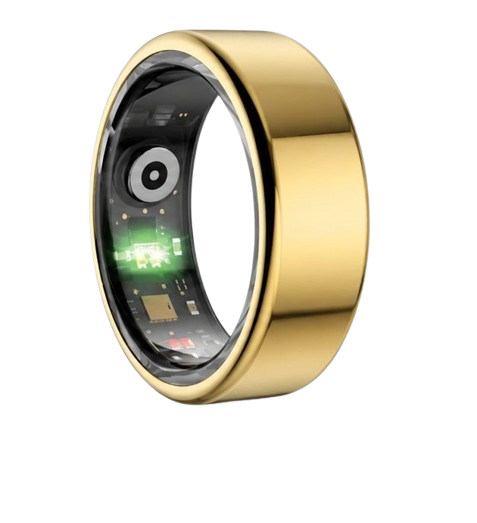
Optical rings utilize highly sensitive green, red, and infrared light-emitting diodes to monitor your continuous blood circulation.
The capillaries in your finger expand and contract rhythmically with each beat of your heart.
The optical sensors track these tiny variations in light absorption to compute your precise pulse frequency.
This dynamic process serves as the technical baseline for modern workout heart rate evaluations.
According to the American Heart Association, continuous pulse monitoring is vital for analyzing physical exertion.
Our team ensures that the Herz P1 tracks these fluctuations with a minimal margin of error.
This allows you to receive highly accurate metrics even during fast, dynamic functional training sessions.
Understanding Metabolic Equivalents (METs) and Energy Calculations
When you manually enter a session, the software applies standardized Metabolic Equivalent (MET) factors.
A MET represents the exact ratio of your active metabolic speed compared to your baseline resting state.
For example, light walking registers around three METs, while intensive running can easily exceed ten METs.
Multiplying this factor by your precise body weight and activity duration calculates your total active calorie expenditure.
This calculated approach ensures your activity tracker smart ring keeps energy records accurate.
It safely fills any data gaps left when sports equipment prevents continuous sensor skin contact.
The resulting integration guarantees that your daily progress data remains reliable and complete.
The Interplay Between Manual Inputs and HRV-Driven Recovery Indicators
Your heart rate variability (HRV) serves as a direct indicator of your autonomic nervous system’s current state.
The parasympathetic branch boosts variability during restful states, whereas the sympathetic branch decreases it during high exertion.
A manual workout log explains to the system why your HRV might drop temporarily after a training session.
This context keeps the algorithm from misinterpreting exercise-induced fatigue as chronic wellness stress.
Our subscription-free workout tracking ring app correlates these manual logs with sleep architecture.
The app calculates a holistic daily readiness score to guide your next physical goals.
This comprehensive view helps you balance strenuous sessions with essential biological downtime.
Maximizing Your Recovery Using the Herz P1 Smart Ring

How to Interpret Your Daily Sleep Architecture
The National Sleep Foundation states that healthy adults require a balanced transition through light, deep, and REM sleep phases.
Deep sleep is the primary stage responsible for physical tissue repair and muscle rebuilding after heavy exercise.
REM sleep supports cognitive consolidation, neurological health, and emotional balance.
The Herz P1 measures these critical stages overnight by tracking subtle changes in your movement and pulse.
If you log a late training session, you might see a brief delay in your deep sleep onset.
Observing these patterns helps you adjust your training schedules to prioritize sleep recovery.
Using a comfortable tracker is key to capturing these delicate changes without disrupting your rest.
Utilizing Smart Ring Workout Insights for Long-Term Progress
Consistently updating your manual logs unlocks valuable smart ring workout insights over time.
The software aggregates your fitness records to display weekly and monthly cardiovascular trends.
You can easily compare your physical output across different types of cardio sessions.
This continuous review highlights whether your overall cardiovascular efficiency is improving.
These detailed patterns empower you to adjust your fitness milestones based on real baseline data.
Our team designed the companion app to display these patterns through clear, intuitive visual graphs.
This keeps you fully informed and motivated as you work toward your active lifestyle goals.
Managing Your Training Load with Manual and Automatic Data Syncing
Relying exclusively on automatic activity detection can sometimes lead to incomplete workout logs.
Isometric routines, strength training, and yoga may not generate the rhythmic motion needed for automated triggers.
Blending passive movement logging with manual updates creates a highly accurate workout history.
The Herz P1 companion software combines both sources into a single, clean timeline.
This keeps your daily energy expenditure records completely accurate and reliable.
You can then adjust your hydration and nutrition plans with confidence based on these verified metrics.
Maintaining this balance is essential for preventing physical burnout and supporting peak long-term progress.
Avoiding Common Fitness Tracking Mistakes and Subscription Traps
The Hidden Cost of Bulky Smartwatches and Fragile Wearables
Many active individuals find it highly uncomfortable to wear heavy, oversized smartwatches to bed.
These bulky screens are also prone to scratching and catching on equipment during workouts.
Additionally, frequent low-battery warnings require you to remove your watch during essential resting periods.
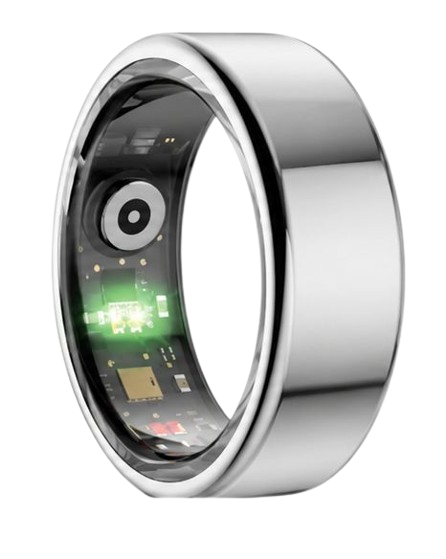
The Herz P1 smart ring addresses these pain points with its lightweight, low-profile design.
Built with military-grade steel, it is exceptionally durable and scratch-resistant.
The slim profile allows you to track overnight recovery comfortably without wrist irritation.
This comfort is crucial for gathering continuous, high-quality biometric trends over time.
Steering Clear of High Monthly Subscription Fees
The fitness wearable market is filled with devices that require ongoing paid subscriptions to view your own data.
Purchasing an expensive physical tracker only to be charged a monthly fee can be highly frustrating.
These recurring charges quickly inflate the total cost of ownership after just a few years.
Team Herz P1 believes your personal physiological records should be completely yours to view.
Our companion application is entirely free for life, with absolutely no monthly subscriptions required.
This transparent approach ensures premium wellness tracking remains open to everyone.
You pay once for the hardware and enjoy full, unrestricted access to your health trends forever.
Frequently Asked Questions About Herz P1 and Workout Tracking
Is the Herz P1 Smart Ring waterproof?
Yes, the Herz P1 is designed with a premium IP68 waterproof rating.
This certification ensures full protection during deep swimming, showering, and intense sweaty workouts.
You can submerge the ring safely in fresh and saltwater down to depths of 164 feet.
This makes it highly convenient to track water-based sports without worry.
How long does the battery last on a single charge?
The Herz P1 delivers up to six days of battery life on a single charge.
It charges from zero to one hundred percent in under one hour using our magnetic dock.
This long battery life eliminates the daily charging hassle common with average smartwatches.
It allows for consistent, multi-day tracking of your sleep and exercise habits.
Which finger is best to wear the smart ring on?
Our team recommends wearing the smart ring on your index finger for the most accurate sensor readings.
The middle and ring fingers are also highly effective alternative choices.
Ensure that the inner sensor nodes sit flat against the palm side of your finger.
A snug fit keeps the ring secure and prevents it from rotating during exercise.
Does the Herz P1 store health data offline?
Yes, the ring features robust built-in memory that saves up to seven days of raw biometric data offline.
Your fitness metrics remain secure even if you are away from your phone during a workout.
The ring will automatically sync all stored logs the next time you open the app.
This background backup guarantees that you never lose important recovery trends.
How do I edit an entry if I enter the wrong duration?
You can easily update any logged activity within your companion application.
Go to your fitness timeline and select the specific log you need to modify.
Tap the edit button to adjust the start time, duration, or workout category.
Saving these adjustments will instantly update your daily calorie burn and recovery scores.
90-Day 100% Money-Back Guarantee
“The Herz Smart Ring helps me manage stress easily. It’s accurate, stylish, and lightweight—perfect for my busy life!”
— Jennifer P. | ✔ Verified Customer
- ✓ 6-Day Battery Life
- ✓ Detailed Sleep Analysis
- ✓ Fast 1-Hour Charging
- ✓ iOS & Android Ready
Questions? Call: 1-866-479-1629
Conclusion: Your Subscription-Free Wellness Journey Starts Here
The Herz P1 Smart Ring combines military-grade durability, subscription-free tracking, and premium comfort. It is your reliable, daily health companion. Ready to monitor your vitals? Explore the Herz P1 Smart Ring and elevate your wellness. Call: **1-866-479-1629** — our team is here to help you select your perfect ring size and set personalized health goals.
