

Losing a smart ring can induce instant panic, but you can quickly recover your lost wearable by using a specialized find my ring app to scan for local signals. Our team at Herz P1 is dedicated to keeping you connected, which is why we engineered our military-grade tracker with a highly resilient transmitter. If you are searching for your ring, this comprehensive recovery guide will walk you through the precise tracking methodologies to find your Herz P1 right now.
Built to Last. Save Up to 69% Today.
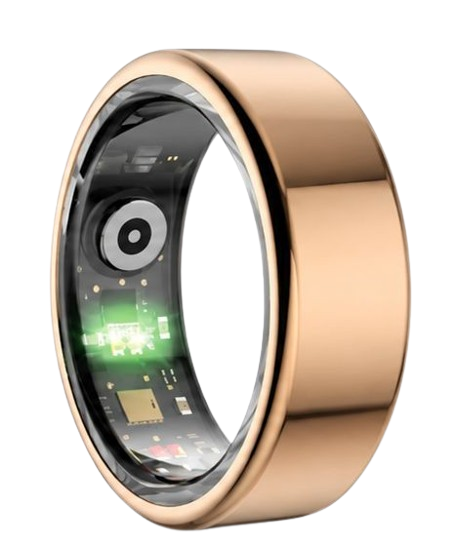
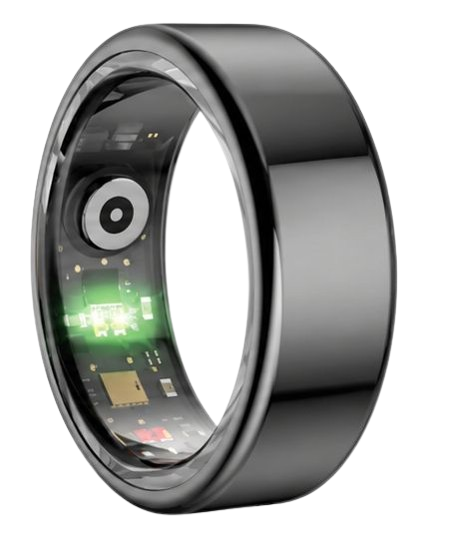
The Herz P1 Smart Ring tracks HRV, Sleep, Heart Rate & SpO2 around the clock. No subscriptions. No renewals. Ever.
In This Article
- Locate Your Ring Methodically: A step-by-step wireless tracking guide for immediate recovery.
- Master Signal Physics: Understand RSSI values and physical barriers to find the device faster.
- Verify Battery Recovery Windows: Learn how battery life dictates tracking success.
- Protect Your Privacy: Steps to secure your biometric databases and account settings during searches.
How to Locate Your Lost Wearable: A Step-by-Step Guide
You will need an active iOS or Android smartphone with Bluetooth turned on.
You should also ensure that your primary companion app is installed.
If possible, keep other Bluetooth devices in the area powered off to minimize signal interference.
Step 1: Check Bluetooth Signal and App Connection Status
Open your smartphone’s central Bluetooth settings menu.
Look at the active devices list to see if your wearable is currently showing as connected.
A live connection indicates that your ring is located within thirty feet of your current position.
Next, launch your primary smart ring app to verify the last synchronized sync timestamp.
If the app successfully connected just minutes ago, the device is definitely nearby.
Do not close the companion application while performing this initial assessment.
Keeping the app active helps maintain any weak connection packets that might still be passing between the devices.
If the connection is currently active, you can begin a localized physical search immediately.
If the device is disconnected, do not despair.
We will now move to scanning the surrounding airwaves for dormant signals.
Step 2: Download and Launch a Dedicated Bluetooth Smart Ring Finder App
Navigate to the Apple App Store or Google Play Store on your mobile device.
Search for a highly rated bluetooth smart ring finder or a general Bluetooth signal scanner app.
These utilities are specifically designed to detect the raw Bluetooth Low Energy signals emitted by your wearable.
Install the chosen utility and grant all requested permissions for Bluetooth and location services.
Once the application is running, it will automatically begin a real-time scan of all local wireless signals.
Look for a device labeled with your ring’s brand name or a generic “BLE Wearable” tag.
This utility acts as your dedicated find my ring tool.
It will display a signal strength indicator that changes as you move.
Do not download untrusted third-party apps that ask for sensitive personal data.
Stick to highly rated utilities that respect your privacy while performing local scans.
Step 3: Analyze Signal Strength (RSSI) in Real-Time
Understand that Bluetooth tracking relies on Received Signal Strength Indicator values, which are measured in decibels.
These decibel values typically range from negative one hundred to negative thirty.
A reading of negative one hundred indicates that the device is at the very edge of detection range.
A reading of negative thirty means you are virtually touching the device.
Watch the scanner screen closely as you slowly rotate your body in a complete circle.
Note the direction that yields the lowest negative number, as this indicates a stronger signal.
This real-time feedback is crucial for narrowing down the search parameters.
Take slow, deliberate steps and wait five seconds after each step for the data to refresh.
This slow movement allows the hardware to update its transmission metrics accurately.
If the signal strength suddenly drops, take a step backward to re-establish the stronger zone.
Step 4: Execute a Systematic Grid Search Pattern
Divide your living space or search area into a clear, imaginary grid.
Begin walking slowly through each section of the grid while holding your phone in front of you.
Make sure to sweep your phone high and low as you walk.
Smart rings can easily fall behind couch cushions, drop into deep laundry baskets, or slip under heavy rugs.
If you lost your ring while exercising, refer to your active workout tracking ring app data to narrow down the workout zone.
Pay close attention to metallic objects or thick walls that can temporarily block the signal transmission.
If you walk into a room and the signal jumps to negative forty, you have entered the immediate zone.
Begin scanning smaller surfaces like tables, shelves, and electrical outlets.
Do not rush this process or skip any hard-to-reach corners.
Keep your movements steady to ensure the scanner captures every single signal pulse.
Most successful recoveries happen when users methodically isolate one room at a time.
Step 5: Verify the Location and Retrieve Your Wearable
Once the signal strength indicator peaks at its highest possible value, stop walking.
Look around your immediate vicinity for any tiny gaps, crevices, or fabrics.
Gently pat down soft furnishings, blankets, and clothing pockets.
If the ring is wedged between cushions, the signal will remain strong but hidden from view.
Use a flashlight to peer into dark spaces where a metallic ring might not catch the light.
Once you spot the device, pick it up and inspect it for any external debris or moisture.
Open your primary health ring app to confirm the connection has fully restored.
This step completes the active recovery protocol and ensures your data syncs.
Take a moment to clean the sensor window with a soft microfiber cloth before putting it back on.
You have successfully recovered your tracking device using logical wireless physics.
Enhance Your Tracking Security with Herz P1
Losing a device is stressful, but our team at Herz P1 has designed our hardware to mitigate these moments.
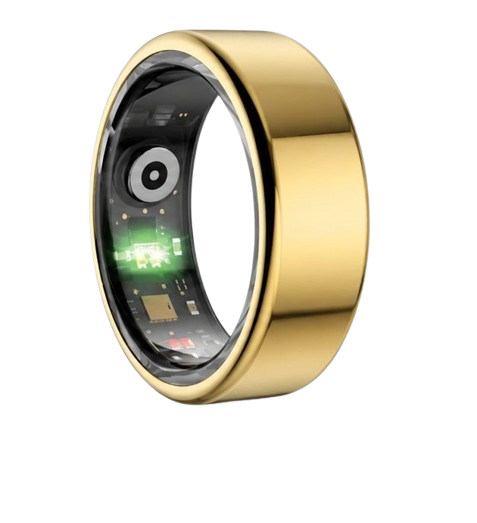
The Herz P1 Smart Ring utilizes an advanced Bluetooth transceiver that maintains a stable connection up to thirty-three feet.
This ensures that our subscription-free app can locate your ring quickly before the battery drains.
Additionally, our military-grade steel construction ensures that if your ring falls onto hard concrete or slips behind a metal radiator, it remains completely undamaged.
Discover the peace of mind that comes with premium, durable health tracking without monthly fees.
Check out the Herz P1 Smart Ring to upgrade your wearable experience today.
The Physics of Bluetooth Tracking: How Finder Apps Measure Signal Strength

Understanding the core science of wireless signals can dramatically speed up your recovery efforts.
Bluetooth Low Energy technology operates on the standard two point four gigahertz radio frequency band.
Every active smart ring continuously broadcasts tiny advertising packets to announce its presence to nearby devices.
A specialized find my ring app intercepts these advertising packets and measures their power.
This power level is represented as the Received Signal Strength Indicator, or RSSI.
RSSI is expressed in decibels, which is a logarithmic unit of measurement.
Because wireless signals degrade over distance, the decibel values are always negative.
A very strong signal close to your phone might measure negative thirty decibels.
As you move further away, that number will drop toward negative ninety decibels.
Physical obstacles in your home will also absorb or reflect these radio waves.
For instance, drywall will slightly reduce the signal, while solid concrete or metal sheets can block it entirely.
This is why a ring hidden inside a metal drawer is much harder to detect from a distance.
Water is also highly effective at absorbing two point four gigahertz radio frequencies.
If your ring is submerged in a filled sink or trapped inside a wet laundry pile, the signal range will be severely limited.
By understanding these physics, you can strategically search around metal and water barriers first.
This scientific approach removes the guesswork from locating your high-tech wearable.
| Signal Strength (RSSI) | Approximate Distance | Recommended Search Action |
|---|---|---|
| -30 dBm to -50 dBm | Within 5 feet | Check close cushions, pockets, and drawers immediately. |
| -60 dBm to -80 dBm | 10 to 20 feet | Move room-to-room slowly to isolate the peak signal. |
| -90 dBm to -100 dBm | Over 30 feet | Clear physical obstructions and walk toward other rooms. |
Why Your Smart Ring’s Battery Status is Critical for Location Recovery
A Bluetooth tracker can only emit wireless signals if its onboard battery has remaining power.
Once a wearable’s battery completely drains, it becomes a passive metal object that cannot be tracked electronically.
This makes the battery life of your device the single most critical factor in a successful recovery.
Many smart rings on the market only last two or three days on a single charge.
If you lose one of those devices over a long weekend, your window for tracking is extremely narrow.
The lost smart ring tracking process becomes a race against time before the power dies.
Our team at Herz P1 solved this anxiety by engineering a highly efficient power management system.
The Herz P1 Smart Ring features an impressive six-day battery life on a single charge.
This extended battery capacity gives you a massive window of opportunity to perform a search.
Even if you misplace your ring before a short trip, it will likely still be broadcasting when you return.
Furthermore, our advanced rapid charging system fully replenishes the battery in under one hour.
This means your ring is almost always at a high charge state, maximizing your chances of a successful location sweep.
If your device does happen to lose power, you will have to rely on visual search methods.
To avoid this, we recommend checking your app’s battery widget daily.
Maintaining a healthy charge state is your best insurance policy against permanent loss.
Managing Safety Tracking and Preventing Future Loss of Your Smart Ring
Preventing a loss is always far easier than searching for a missing device after the fact.
You can build simple habits and configure your digital setup to make recovery seamless.
First, we highly recommend adding dedicated smart ring widgets to your mobile home screen.
These widgets display real-time connection status and battery levels directly on your screen.
If you glance at your phone and see the widget icon turn grey, you immediately know your ring has disconnected.
This instant feedback allows you to retrace your steps within minutes rather than hours.
Second, explore the partner app integrations smart ring features within your system.
Some integrations can log the exact GPS coordinates of your phone the moment the Bluetooth connection breaks.
This creates an automatic digital breadcrumb trail that points directly to the last known location.
If you often lose items at the gym, this feature will tell you if the ring was left there or at home.
Third, establish a dedicated charging spot on your nightstand or desk.
Always place the ring in this specific spot whenever you take it off to wash your hands or apply lotion.
Consistency builds muscle memory and eliminates accidental misplacement.
Our military-grade steel construction is highly scratch-resistant, but keeping it in a safe dock is still best practice.
By setting up these digital and physical safety nets, you ensure your health tracking remains uninterrupted.
Common Tracking Pitfalls and How to Avoid Security Risks
Many users make critical errors during their search that can permanently compromise their device recovery.
The most common mistake is walking too fast while using a signal scanner app.
Bluetooth signals transmit in short pulses, often spaced several seconds apart.
If you sprint through your house, you will likely pass right by the ring without registering a signal jump.
Another massive pitfall is using a bulky, power-hungry smartwatch to sleep or exercise.
These oversized watches are highly uncomfortable, leading users to take them off and leave them in random spots.
A sleek smart ring is far easier to wear twenty-four hours a day, drastically reducing the chances of losing it.
Furthermore, you must ensure that your private biometric data remains fully secure during any recovery process.
If you ever suspect your device was stolen, you should immediately reset smart ring account details to protect your data.
Never share your account credentials with unverified tracking utilities on the app store.
When configuring your profile, complete the secure smart ring account setup with two-factor authentication enabled.
This guarantees that even if someone physically finds your ring, they cannot access your personal health database.
Team Herz P1 utilizes military-grade encryption to protect your records at all times.
By avoiding these tracking mistakes, you protect both your physical hardware and your private biological metrics.
Frequently Asked Questions About Locating Your Smart Ring
Is the Herz P1 Smart Ring waterproof?
Yes, the Herz P1 is fully IP68 waterproof and built to withstand depths of up to one hundred and sixty-four feet.
This military-grade protection means you do not have to remove it when swimming, showering, or washing dishes.
If you drop the ring in a sink full of water, it will continue to broadcast its signal safely.
You can use a signal scanner to locate it underwater without worrying about short-circuiting the hardware.
How long does the Herz P1 battery last on a single charge?
The Herz P1 battery is engineered to last up to six full days under normal continuous use.
When it is time to recharge, the device goes from empty to one hundred percent in under one hour.
This rapid charging capability minimizes the time your ring spends off your finger.
A longer battery life ensures a much wider tracking window if you happen to misplace it.
Which finger is the best option to wear your smart ring on?
The index finger is highly recommended for obtaining the most accurate biometric readings.
The middle finger is also an excellent secondary option for daily wear.
Whichever finger you choose, ensure the ring fits snugly without restricting your blood circulation.
A proper fit prevents the ring from slipping off accidentally during physical activity.
To learn how to fit and configure your new device, check out our guide on how to set up smart ring.
Does the Herz P1 Smart Ring store health data offline?
Yes, the Herz P1 has onboard flash memory that safely stores up to seven days of biometric data offline.
If you lose connection to your phone, your sleep, HRV, and stress metrics are not lost.
The moment the ring reconnects to your mobile device, all logged data automatically synchronizes to the cloud.
This local storage provides excellent data protection and peace of mind.
90-Day 100% Money-Back Guarantee
“The Herz Smart Ring helps me manage stress easily. It’s accurate, stylish, and lightweight—perfect for my busy life!”
— Jennifer P. | ✔ Verified Customer
- ✓ 6-Day Battery Life
- ✓ Detailed Sleep Analysis
- ✓ Fast 1-Hour Charging
- ✓ iOS & Android Ready
Questions? Call: 1-866-479-1629
Conclusion: Your Subscription-Free Wellness Journey Starts Here
Locating a misplaced wearable is simple when you understand the science of Bluetooth signals.
With its military-grade steel and six-day battery, the Herz P1 makes recovery highly manageable.
Ready to monitor your health every day?
Explore the Herz P1 Smart Ring and see if it fits your lifestyle.
Call: 1-866-479-1629 — our team can help you advise on the correct ring size and set personalized health goals.
Note: Individual results may vary depending on individual health conditions, age, and lifestyle habits. This article is intended for general health reference purposes only.
