

If your biometric wearable misses a heavy training session, learning how to manually add workout on smart ring systems is essential to protect your daily recovery index. Our team at Herz P1 understands that tracking every single movement is crucial for maintaining an accurate picture of your overall metabolic health. This guide will walk you through the precise steps to log skipped activities, resolve synchronization errors, and optimize your cardiovascular load data easily.
Built to Last. Save Up to 69% Today.
The Herz P1 Smart Ring tracks HRV, Sleep, Heart Rate & SpO2 around the clock. No subscriptions. No renewals. Ever.
In This Article
- Step-by-Step Manual Input Guide: Master logging forgotten training sessions efficiently.
- Recovery Index Calibration: Understand how active inputs adjust metabolic data.
- PPG Sensor Optimization: Overcome motion artifacts and connectivity limits.
- Lifetime Subscription Freedom: Explore the benefits of zero monthly fees.
How to Manually Add Workouts on Smart Ring Apps: A Step-by-Step Guide

Prerequisites and Initial Requirements
Ensure that your smart ring is fully charged to avoid unexpected connection dropouts during the sync process.
Keep your smartphone within five feet of your ring to maintain a strong Bluetooth signal.
Make sure you have updated your companion software application to the latest version available in the app store.
Prepare the approximate start time, overall duration, and relative intensity level of your completed physical activity.
-
Step 1: Open Your Wearable Application and Initialize Sync
Launch the dedicated wellness software on your primary mobile phone.
Wait patiently for the homepage dashboard to load completely.
Observe the status icon at the top of the screen to confirm a live Bluetooth connection.
Swipe down on the main screen to force a manual synchronization of your latest biometric files.
Ensure that all morning sleep metrics have transferred from your ring to the cloud database.
-
Step 2: Access the Central Log Creator Menu
Locate the primary menu bar or the navigation drawer on your active dashboard screen.
Identify the floating action button which is usually styled as a small plus symbol.
Tap this interactive icon once to reveal the dropdown selection of direct data inputs.
Select the option to edit daily activity log manually from the visible list.
Wait for the software to compile and present the custom workout setup screen.
-
Step 3: Define Your Specific Exercise Classification
Scroll systematically through the alphabetical list of sport and cardiovascular categories.
Select the exact classification that matches your completed physical training session.
Choose a generalized cardio option if your highly specialized sport is not explicitly listed.
Avoid selecting a generic category unless no reasonable alternative exists in the database.
Correct exercise classification allows the underlying algorithm to calculate accurate metabolic equivalents.
-
Step 4: Input Chronological Details and Intensity Factors
Tap the start time field to open the chronological dial selector tool.
Set the precise hour and minute that your training session originally commenced.
Enter the exact end time or key in the overall duration in minutes.
Adjust the subjective scale slider to rate your perceived rate of overall physical exertion.
Double-check that the date selected matches the actual calendar day of the physical activity.
-
Step 5: Review, Save, and Confirm Synchronization
Examine the summarized page containing your workout details for potential typographical errors.
Tap the primary save or confirm button located at the top right of the interface.
Wait for the application to process the new data points and calculate active caloric metrics.
Check the central daily timeline to verify that the manually logged sport block appears correctly.
Observe how your overall recovery indicators recalibrate dynamically after saving the physical log.
Enhancing the Calibration Experience
Entering your physical records should never feel like a complicated administrative chore.
The workout tracking ring app designed by Herz P1 streamlines this process beautifully.
By blending manual updates with continuous background readings, it creates a fully integrated picture of your health.
This allows Team Herz P1 to deliver customized cardiovascular insights without asking for monthly membership fees.
Experience the simplified utility of the Herz P1 Smart Ring to upgrade your wellness tracking today.
How Manual Entries Balance Your Metabolic Ledger

Your calculated recovery score relies closely on balancing physical strain against active neurological rest.
If an intensive workout is left unrecorded, the application assumes your skeletal muscles were completely sedentary.
This systematic missing data results in an inaccurate calculation of your actual daily energy expenditure.
According to clinical publications from the American Heart Association, tracking cardiovascular load is vital for cardiac care.
By manually logging your events, you provide the calorie figures necessary to correct your metabolic trends.
The companion algorithm combines these details with your heart rate variability statistics.
Consequently, you receive a highly realistic readiness score that reflects your genuine muscular recovery needs.
This calculated metric helps you plan subsequent active sessions safely and avoids overtraining syndrome.
The Physics of Optical Finger Sensors During Vigorous Exercise
Smart rings rely on advanced photoplethysmography to track cardiovascular metrics at the base of your finger.
These specialized optical arrays emit light wavelengths directly through the capillary walls of your skin.
During explosive movements, rapid hand placement changes can introduce significant physical motion artifacts.
The delicate light sensors may briefly lose direct contact with the skin barrier during heavy lifting.
This is why automatic activity detection protocols occasionally require manual user intervention.
If the device cannot verify a stable heart pulse during intense gripping, it will refuse to log the workout automatically.
By adding your training manually, you bridge this data gap and protect the integrity of your trends.
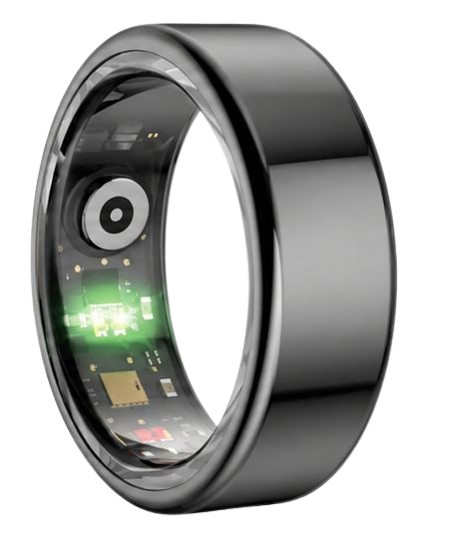
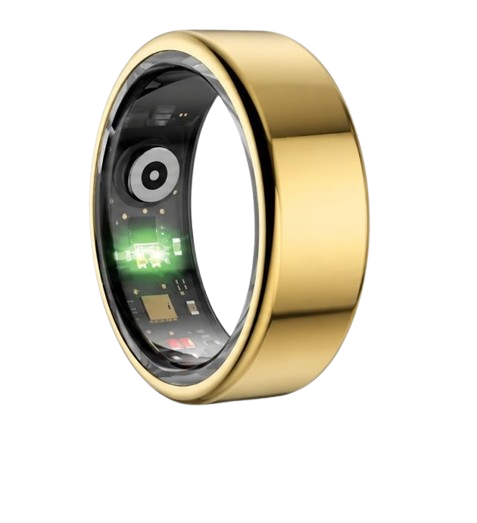
The Herz P1 uses a multi-spectral optical cluster to reduce the likelihood of these tracking dropouts.
Our engineering team integrates green, red, and infrared light paths to capture steady readings during movement.
Evaluating Your Sleep Staging and Post-Workout Recovery Cycles
The timing of your workouts plays a massive role in regulating your overnight sleep architecture.
According to the National Sleep Foundation, completing intensive exercise late in the evening can impair rest.
Late workouts stimulate the central nervous system, raising your baseline body temperature for several hours.
This elevated temperature delays the onset of essential restorative sleep stages like deep and REM sleep.
When you utilize smart ring workout insights, you can correlate your exercise timing with sleep metrics.
The app shows you whether evening cardio sessions are fragmenting your deep sleep cycles.
The Herz P1 tracks these deep neurological shifts and blood oxygen variations with scientific precision.
Analyzing these parameters enables you to find the ideal daytime window for your hard workouts.
Optimizing Sleep and Exercise Intensity Using Biometric Data

Interpreting your daily health statistics on the Herz P1 application is highly intuitive and straightforward.
The central home screen organizes your sleep staging, heart rate trends, and stress scores logically.
You can easily track weekly trends to determine if your baseline heart rate variability is improving over time.
Use these metrics to adapt your workout volumes based on real physical data rather than simple guesswork.
If your early morning HRV score drops significantly, schedule a light walk instead of a strenuous run.
When your readiness score is consistently high, you can confidently proceed with heavy weight training.
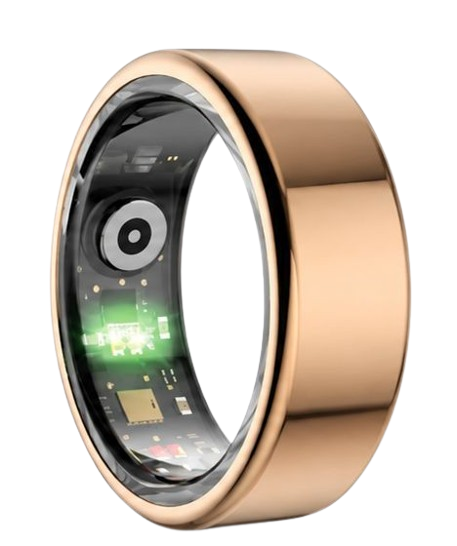
The military-grade steel body of the Herz P1 allows for comfortable, irritation-free wearing all day and night.
Unlike bulky watches, this lightweight ring does not catch on blankets or disturb your wrist during sleep.
Continuous wear ensures your health records remain complete and highly accurate over months of tracking.
Avoiding Common Smartwatch Mistakes and Wearable Subscription Fees
Many health-conscious individuals make the mistake of wearing massive, heavy smartwatches to bed.
These bulky devices easily slide around the wrist during sleep, creating huge gaps in your sleep logs.
An elegant activity tracker smart ring fits snugly at the finger base for reliable, uninterrupted monitoring.
Another major frustration in the modern consumer wearable industry is the rise of monthly subscription fees.
Several brands lock your heart rate analysis and sleep charts behind expensive recurring paywalls.
Our team believes that you should never have to pay a fee to access your own biometric data.
The Herz P1 companion software application is completely free for life, with zero recurring charges.
This setup allows you to track long-term cardiovascular health trends without worrying about hidden membership fees.
Frequently Asked Questions
Yes, the Herz P1 is fully certified with an IP68 dust and waterproof rating.
It can withstand continuous submersion in water up to 164 feet deep without damage.
You can safely wear the ring in lap pools, in the shower, or while washing your hands.
The sealed internal electronics protect the optical PPG sensor array from liquid ingress.
The Herz P1 features a long-lasting battery that provides up to 6 days of continuous operation.
This extended battery life reduces the hassle of carrying chargers when traveling.
The device reaches a full charge in under 1 hour when using the included charging cradle.
We recommend giving it a quick charge during your morning grooming routines to keep it topped up.
The index finger of your non-dominant hand is the recommended position for optimal PPG tracking.
The middle finger and ring finger also provide excellent performance for daily tracking.
Choose a finger where the ring fits snugly without being too tight or sliding off during workouts.
A proper fit ensures that the sensor maintains constant contact with the skin for precise measurements.
Yes, the ring includes secure local storage that saves up to 7 days of raw health data offline.
This allows you to exercise or sleep without keeping your smartphone nearby at all times.
Your recorded biometrics will sync to the mobile app automatically once the Bluetooth link reconnects.
This is highly convenient for outdoor runs or swimming sessions where carrying a phone is impractical.
90-Day 100% Money-Back Guarantee
“The Herz Smart Ring helps me manage stress easily. It’s accurate, stylish, and lightweight—perfect for my busy life!”
— Jennifer P. | ✔ Verified Customer
- ✓ 6-Day Battery Life
- ✓ Detailed Sleep Analysis
- ✓ Fast 1-Hour Charging
- ✓ iOS & Android Ready
Questions? Call: 1-866-479-1629
Conclusion
Tracking your physical performance has never been easier than with the subscription-free Herz P1.
Ready to monitor your health every day?
Explore the Herz P1 Smart Ring and see if it fits your lifestyle.
Call: 1-866-479-1629 — our team can help you advise on the correct ring size and set personalized health goals.
