

Managing your daily health metrics across multiple applications can feel incredibly frustrating when your devices fail to communicate. That is why establishing a seamless google fit smart ring integration is the ultimate way to centralize your sleep architecture, heart rate variability, and step counts. If you are tired of fragmented health statistics, the subscription-free Herz P1 smart ring provides a rugged, military-grade solution engineered to sync perfectly with your Android health dashboard. This comprehensive step-by-step guide will walk you through the setup process to ensure your biometric tracking remains fully unified and accessible.
Built to Last. Save Up to 69% Today.
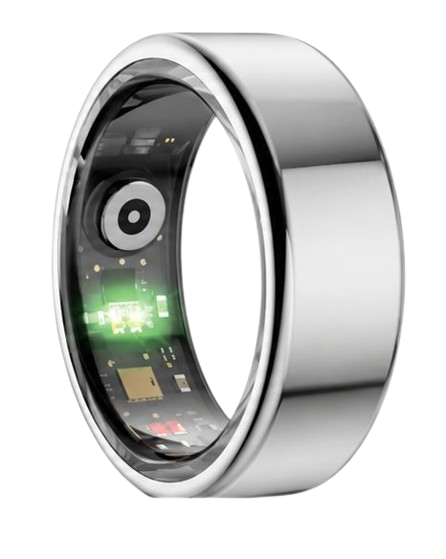
The Herz P1 Smart Ring tracks HRV, Sleep, Heart Rate & SpO2 around the clock. No subscriptions. No renewals. Ever.
In This Guide
- Step-by-step instructions for a complete Google Fit smart ring integration.
- Technical insights into optical PPG sensor technology and health metric accuracy.
- Methods for analyzing heart rate variability (HRV) and sleep staging data.
- Troubleshooting steps to resolve common synchronization delays and system errors.
How to Sync Your Smart Ring to Google Fit: A Step-by-Step Guide

Prerequisites and System Requirements
Before you begin the synchronization process, ensure you have an active android smart ring ready for pairing.
You must download the Google Fit app directly from the Google Play Store on your device.
You also need to install the secure health connect by android utility tool to serve as your central data bridge.
Make sure your mobile phone has Bluetooth enabled and has a stable connection to your home internet network.
Keep your smart ring fully charged and within three feet of your smartphone to prevent setup interruptions.
-
Step 1: Open Your Smart Ring Companion App
First, launch the dedicated companion application designed for your wearable hardware on your phone.
Navigate directly to your personal profile settings tab situated in the primary navigation menu.
Check that your ring is currently connected and actively transmitting raw biometric metrics to the interface.
We recommend performing a quick manual data update inside the app to establish a fresh baseline.
This action ensures that all your latest sleep logs and heart readings are local to your smartphone memory.
-
Step 2: Access the Partner Integrations Menu
Next, find the section of your companion app that controls connections to external health programs.
This menu option is frequently labeled as partner app integrations smart ring settings.
Locate the specific selection icon representing either Google Fit or Android Health Connect.
Tap on the configuration toggle switch to begin bridging your device data with your phone’s storage.
The companion system will prompt you to authorize external read and write commands.
-
Step 3: Enable Google Health Connect Permissions
The companion software will redirect your screen to the central smart ring app integrations portal.
This system screen manages security clearances for the modern health connect by android protocol.
Select the “Allow All” button to provide full transmission clearance for every biometric metric.
Alternatively, you can manually allow access for individual metrics like steps, active heart rate, or sleep stages.
We advise keeping all switches enabled to allow Google Fit to build a comprehensive view of your wellness.
Tap the confirm button at the base of your screen to save these custom security permissions.
-
Step 4: Connect Google Fit to the Shared Database
Now, minimize your ring’s companion app and open the official Google Fit software on your phone.
Tap on your user profile avatar situated in the lower-right corner of the home interface.
Select the gears icon to open the main settings panel of your Google Fit profile.
Scroll down through the options until you locate the “Sync Fit with Health Connect” setting.
Toggle this switch to the active position to link Google Fit to your phone’s master database.
Verify that Google Fit has read access to the exact data categories you authorized in the previous step.
-
Step 5: Verify Your Real-Time Data Synchronization
To confirm your google fit smart ring integration is active, take a brief walk of fifty steps.
Allow your smart ring’s primary app to update its dashboard via its normal Bluetooth connection.
Next, launch your Google Fit dashboard and slide your finger downward to refresh the timeline.
Verify that your step count and heart rate metrics update automatically to match your ring’s logs.
You have successfully completed a secure sync smart ring to google fit setup process.
The subscription-free Herz P1 makes this entire synchronization process straightforward and completely user-friendly.
Our advanced companion software is built to integrate with Android’s ecosystem in less than three minutes.
We prioritize clear design to ensure you do not have to struggle with confusing system setups.
Explore the rugged Herz P1 Smart Ring today to experience premium metric synchronization with zero recurring monthly fees.
The Science of Finger-Based Photoplethysmography (PPG) Sensors

Smart rings track your biological signals using a light-based measurement technique called photoplethysmography.
The vascular system in your fingers provides a much stronger signal than the blood vessels located in your wrist.
This anatomical advantage allows miniature ring sensors to capture extremely clean heart waveforms.
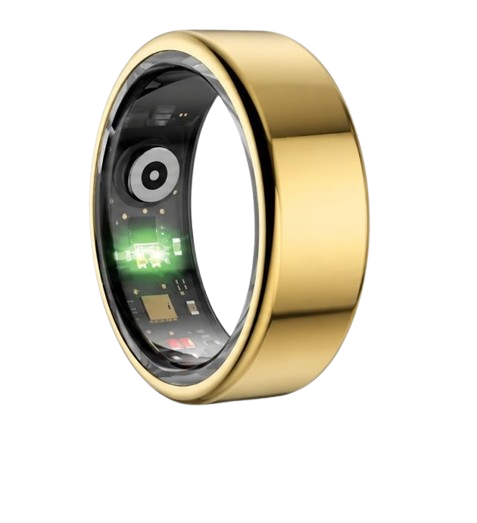
The Herz P1 uses multi-wavelength PPG sensors that emit red, green, and infrared light beams.
These light waves penetrate the capillaries at the base of your finger to track blood volume changes.
The green light sensor is highly effective for measuring active heart rate during high-movement workouts.
The infrared light sensor measures your resting heart rate and heart rate variability (HRV) while you sleep.
The red light sensor measures your blood oxygen saturation (SpO2) levels by assessing oxygen levels in your blood.
Independent research from the American Heart Association confirms that finger-based pulse tracking is highly accurate.
Our sensor technology operates with a margin of error under two percent compared to medical-grade ECG machines.
This level of precision ensures that all metrics sent to your Google Fit dashboard are reliable and accurate.
By using multiple light wavelengths, the ring filters out movement interference and cold-weather skin changes.
This advanced engineering delivers a stable stream of health insights directly to your Android device.
The Technical Architecture of Android Health Connect
Historically, connecting individual wellness devices to popular services was quite difficult.
Many third-party apps required continuous background processes that rapidly drained smartphone batteries.
Google solved this problem by creating health connect by android as a native system tool.
Health Connect serves as an encrypted on-device database that coordinates information across various apps.
When you use an android smart ring, the companion app writes your heart rate, sleep stages, and active steps directly to this secure system database.
Google Fit then pulls this data securely to populate your daily and weekly progress charts.
This shared database model eliminates the need for direct, battery-draining app-to-app communication.
This integration supports data sharing for over thirty distinct biometric points.
Your personal information remains completely private and encrypted directly on your smartphone.
This system design also lets you control read and write access for each connected app independently.
If you transition to an iOS device, you can easily switch to an apple health sync smart ring configuration.
This cross-platform flexibility ensures that you are never locked into a single operating system.
Using a standardized system hub ensures your fitness metrics remain accurate and secure over time.
Advanced Strategies for Analyzing Biometrics in Google Fit
Connecting your devices is just the first step toward optimizing your daily wellness routine.
The real value of your google fit smart ring integration lies in your ability to understand and use this data.
We recommend reviewing your consolidated sleep stages in Google Fit every morning.
The National Sleep Foundation emphasizes that adults require a healthy balance of deep and REM sleep for recovery.
Deep sleep facilitates physical muscle recovery, while REM sleep supports memory and mental clarity.
If your deep sleep drops below twenty percent of your total sleep, consider adjusting your workout routine.
You can also use daily heart rate variability (HRV) metrics to evaluate your nervous system’s recovery state.
A high HRV score indicates that your body is rested and prepared for high-intensity physical training.
A sudden drop in HRV suggests that your cardiovascular system is responding to stress or fatigue.
When you see a low HRV score in Google Fit, focus on light active recovery instead of strenuous exercise.
This proactive approach helps prevent sports injuries, chronic fatigue, and physical burnout.
The Herz P1 measures your metrics around the clock to provide an accurate recovery score each morning.
Consolidating these insights inside Google Fit helps you make informed choices about your physical health.
Overcoming Common Sync Pitfalls and Technical Issues
Even with advanced technology, small settings issues can occasionally disrupt your data synchronization.
The most common cause of sync delays is Android’s built-in battery optimization settings.
Android devices frequently close inactive background apps to conserve battery life.
If your ring app is closed by the operating system, it cannot sync background data with Google Fit.
To resolve this, navigate to your phone’s battery settings and set your ring app to “Unrestricted.”
This adjustment allows the app to communicate with your ring and update your metrics in the background.
Another common issue involves conflicting step counts from different devices.
If you carry your phone while wearing your ring, both devices will track your steps simultaneously.
Google Fit uses smart algorithms to merge these duplicates and prevent double-counting.
However, you can also disable phone-based tracking in Google Fit’s settings menu.
This ensures that your smart ring serves as the primary source for all physical activity tracking.
If you experience a persistent data delay, try toggling your phone’s Bluetooth connection off and on.
You can also manually trigger a synchronization from your smart ring app’s home dashboard.
The Herz P1 holds up to seven days of biometric data in its local memory.
This onboard memory ensures that your metrics are never lost, even if you are away from your phone.
Practical Application Guide and Lifestyle Integration Tips
Many smart ring users struggle to build a consistent habit of reviewing their daily health metrics.
The best way to stay consistent is to integrate data tracking into your morning routine.
We suggest checking your Google Fit dashboard while enjoying your morning tea or coffee.
Take note of your resting heart rate trends over the past seven days.
A gradual rise in resting heart rate can be an early indicator of physical stress or illness.
The military-grade steel construction of the Herz P1 is designed for comfortable, 24/7 wear.
Unlike bulky smartwatches, the ring’s lightweight profile makes it easy to wear while sleeping.
This continuous wearability ensures you capture uninterrupted, highly accurate sleep data.
You can also wear the ring during intense gym sessions without worrying about scratches or damage.
The durable exterior handles contact with gym equipment, dumbbells, and barbells easily.
This resilience makes the Herz P1 the perfect tool for tracking both athletic training and overnight recovery.
By wearing the device consistently, you provide Google Fit with the data needed to build accurate wellness trends.
Addressing Smart Ring Hardware and Subscription Costs
Many consumer tech brands require ongoing monthly subscription fees to access your health data.
These subscription models can quickly turn an affordable device into a significant long-term expense.
We believe you should never have to pay a recurring fee to access your own biometric history.
The Herz P1 companion app is completely free to use, offering lifetime access with zero monthly charges.
You receive full access to sleep staging, HRV analytics, and SpO2 tracking right out of the box.
This open approach stands in contrast to competitors that lock advanced metrics behind paywalls.
Additionally, wearing a heavy smartwatch to bed can be uncomfortable and disrupt your sleep.
Many users report that smartwatches are too bulky and often pinch their wrists overnight.
Smartwatches also require daily charging, which frequently results in missed sleep tracking sessions.
The Herz P1 solves these issues with its lightweight design and an impressive six-day battery life.
You can charge the ring in under an hour while taking your morning shower.
This convenient charging routine ensures your ring is always ready to monitor your health.
Frequently Asked Questions About Google Fit Smart Ring Integration
Yes, the Herz P1 is built with an IP68 waterproof rating.
This rating ensures the ring is fully protected during swimming, showering, and handwashing.
You can submerge the ring in water up to 164 feet without damaging the internal sensors.
The Herz P1 features an advanced battery that lasts up to six days of continuous use.
This allows you to track your sleep, workouts, and heart rate without needing a daily charge.
The ring charges from zero to one hundred percent in less than one hour using its magnetic dock.
We recommend wearing your smart ring on your index finger for the most accurate sensor readings.
The middle finger and ring finger also serve as highly effective alternatives.
Choose a finger where the ring fits snugly without sliding around during physical activity.
Yes, the Herz P1 features built-in storage that saves up to seven days of metrics offline.
You do not need to keep your smartphone nearby while sleeping or working out.
The ring will automatically sync all saved metrics once it reconnects to your phone’s Bluetooth.
No, the Herz P1 app is completely free to use and requires no monthly subscription.
You retain permanent, full access to every tracked health metric, chart, and trend for life.
This ensures you can monitor your health over the long term without any unexpected costs.
90-Day 100% Money-Back Guarantee
“The Herz Smart Ring helps me manage stress easily. It’s accurate, stylish, and lightweight—perfect for my busy life!”
— Jennifer P. | ✔ Verified Customer
- ✓ 6-Day Battery Life
- ✓ Detailed Sleep Analysis
- ✓ Fast 1-Hour Charging
- ✓ iOS & Android Ready
Questions? Call: 1-866-479-1629
Conclusion: Streamline Your Biometric Tracking Today
Achieving a google fit smart ring integration empowers you to master your daily biometric trends with ease. The Herz P1 Smart Ring delivers clinical-grade data with zero subscription fees. Explore the Herz P1 Smart Ring today. Call: 1-866-479-1629 — our team can help advise on the correct ring size and set personalized health goals.
Note: Individual results may vary depending on individual health conditions, age, and lifestyle habits. This article is intended for general health reference purposes only.
