

Syncing your daily health metrics should never feel like a chore, yet many iOS users struggle to achieve a seamless Herz P1 experience with their native Apple Health dashboard. If you are tired of manual data entry, disconnected metrics, or fragmented sleep scores, understanding how to configure an apple health sync smart ring setup is the ultimate solution to unify your biometric data. This guide will walk you through the precise synchronization process, troubleshoot connection errors, and optimize your daily data flows without any frustrating hidden subscription fees.
Built to Last. Save Up to 69% Today.
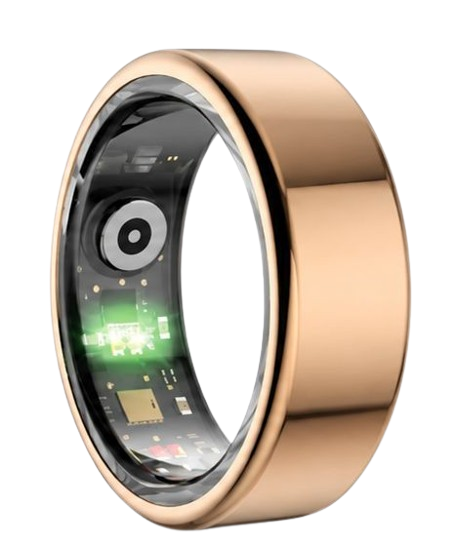
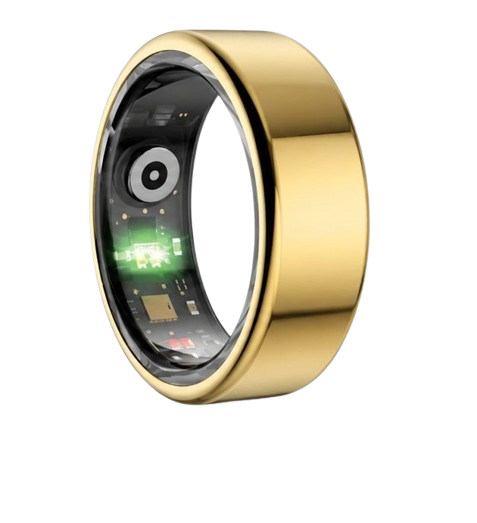
The Herz P1 Smart Ring tracks HRV, Sleep, Heart Rate & SpO2 around the clock. No subscriptions. No renewals. Ever.
In This Article
- Step-by-Step Tutorial: How to establish a flawless link between your smart ring and the iOS health database.
- The Science of Biometric Mapping: Exploring how sensors communicate with your iPhone and what data metrics are captured.
- Heart Rate and Sleep Architecture: Decoding the physiological parameters of sleep cycles and HRV.
- Troubleshooting and Dual-Tracking: Resolving metric conflicts when using multiple wearable devices simultaneously.
How to Setup Apple Health Sync on Smart Rings: A Step-by-Step Guide
Prerequisites and Technical Requirements
To establish a reliable integration, you must ensure your iPhone runs iOS 14 or higher.
Your smart ring must have at least 30% battery remaining to avoid pairing interruptions.
Finally, confirm that your Bluetooth is fully turned on within your system settings.
Step-by-Step Instructions
-
Step 1: Open Your Ring Companion Application
Launch the dedicated app designed to run your smart ring on your iPhone.
Ensure that the ring is actively paired and that your daily data is loaded on the app dashboard.
Keep your ring near your phone to keep the communication channel clear and stable during this process.
This first synchronization sets up the pipeline for your local application to host raw sensory logs.
-
Step 2: Access App Settings and Integrations
Navigate to your profile or settings menu within the smart ring companion app.
Look for menu labels named “Connected Apps,” “Integrations,” or “Data Sharing.”
This menu lists all smart ring app integrations supported by your device.
Tap on the “Apple Health” option to begin the registration handshake.
-
Step 3: Toggle iOS Database Write Permissions
The iOS system will show a permissions popup requesting access to store data.
You must toggle “Allow All” or manually select key parameters like heart rate, sleep analysis, and steps.
Enabling write permissions allows your ring app to transfer recorded metrics directly into the local Apple database.
If you are exploring similar options for Android, look into health connect by android as an alternative pipeline.
-
Step 4: Set Device Priority in Apple Health
Exit your companion app and open the native Apple Health application on your iPhone.
Select the “Sharing” tab at the bottom, then tap on “Apps and Services.”
Choose your smart ring companion application from the active list to verify permissions.
Prioritizing your ring as a primary source ensures that overlapping steps or heart rate logs do not duplicate.
-
Step 5: Verify Your Real-Time Data Sync
Go to your Apple Health “Summary” tab to review your latest biometric records.
You should see your sleep stages, active energy, and heart rate variability fully updated.
Confirm that the numbers match the values shown inside your original ring app dashboard.
To view your live updates directly on your home screen, you can configure smart ring widgets on iOS.
Seamless Health Integration with Herz P1
The Herz P1 Smart Ring is built to optimize this synchronization pipeline automatically.
Our companion application is engineered to prevent battery drain while communicating directly with iOS frameworks.
This allows you to view your recovery scores and stress metrics instantly without paying a subscription fee.
Biometric Data Mapping: How Your Ring Communicates with iOS Health Kits

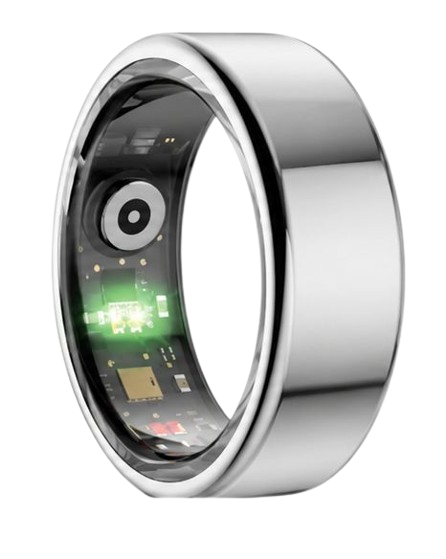
The technology inside your smart ring relies on miniaturized photoplethysmography (PPG) sensors that project optical light paths through your skin.
These optical sensors measure blood flow changes at the base of your finger where blood vessels run close to the surface.
This location offers a much stronger signal than the wrist, resulting in accurate heart rate and blood oxygen saturation readings.
Your smart ring converts light reflections into raw numerical values that the local processor packages into readable metrics.
The companion app reads these packages via Bluetooth Low Energy to minimize power usage while maintaining synchronization.
The software writes these files using Apple Health’s API, mapping metrics like blood oxygen to standard physiological categories.
This communication pipeline enables other partner app integrations smart ring platforms to fetch data instantly.
With correct mapping, Apple Health becomes a central ecosystem for all your sleep, recovery, and fitness metrics.
The Herz P1 Smart Ring utilizes premium red and infrared light paths to capture SpO2 levels with clinical accuracy.
This precise configuration ensures that your iOS device receives verified data points with minimal latency.
Demystifying HRV and Sleep Architecture inside Apple Health
Heart Rate Variability represents the microscopic variations in milliseconds between your consecutive heartbeats.
The American Heart Association highlights HRV as a major indicator of autonomic nervous system balance.
A higher HRV value indicates that your parasympathetic nervous system is helping your body recover from stress.
A lower HRV score shows that your body is working hard under stress, which suggests you need more rest.
Traditional smartwatches often fail to record consistent HRV because sleep movement disrupts wrist-based sensors.
Your finger remains much more stable during the night, allowing the smart ring to record HRV data every 5 minutes.
This deep resolution is crucial for mapping sleep stages including Deep, REM, Light, and Wake cycles.
According to the National Sleep Foundation, adults need consistent deep sleep for physical muscle recovery.
Your ring measures body movement, temperature, and HRV to identify when you transition between sleep stages.
Apple Health receives these sleep records and logs them into comprehensive sleep analysis graphs.
The Herz P1 tracks these sleep shifts with a low margin of error, giving you a detailed view of your recovery.
This granular analysis empowers you to monitor health trends and build healthier routines.
Practical Application: Maximizing Your Synchronized Wellness Dashboard
Once your smart ring and Apple Health are connected, you can start tracking your daily recovery trends.
Checking your morning HRV tells you how hard you can train or work during the day.
If your recovery score is high, your body is ready for high-intensity physical activity.
If your recovery score is low, it is best to focus on active recovery, hydration, and light stretching.
Using these data points helps prevent overtraining and reduces physical stress.
A major benefit of the smart ring is its comfortable, low-profile design.
Unlike bulky smartwatches, the Herz P1 is lightweight and comfortable to wear 24/7.
It is made of military-grade steel, ensuring high durability during gym workouts and household tasks.
This comfortable design makes it easy to collect continuous sleep data without any wrist irritation.
This constant data stream gives Apple Health a complete view of your cardiovascular health.
Overcoming Common Pitfalls of Dual-Wearer Health Tracking
Many health enthusiasts wear both an Apple Watch and a smart ring at the same time.
Wearing both can cause duplicate steps or calorie counts within Apple Health.
To fix this, go to your Apple Health settings and place your smart ring app high on the data source priority list.
This setting ensures Apple Health prioritized the smart ring’s precise measurements without doubling your steps.
Another common mistake is wearing a heavy smartwatch to bed to track sleep patterns.
Large screens are prone to light up at night, which can disrupt your sleep cycles.
A smart ring offers a screen-free, distraction-free option that monitors sleep without waking you up.
Additionally, smartwatches often need to be charged daily, which leads to gaps in your overnight sleep tracking.
The Herz P1 features a 6-day battery life and fully charges in less than an hour, eliminating charging gaps.
The companion app is completely subscription-free, giving you full lifetime access to all biometric dashboards.
If you decide to switch mobile platforms, our app also supports google fit smart ring integration seamlessly.
Herz P1 vs. Competitors: Technical Feature Comparison
Choosing the right health companion requires a clear understanding of features and long-term costs.
The table below highlights key specifications for leading smart rings on the market in 2025.
| Feature Checklist | Herz P1 Smart Ring | Standard Premium Brand | Alternative Wearable |
|---|---|---|---|
| Monthly Subscription Fee | $0 (Free App For Life) | $5.99 to $9.99 per month | $0 (Limited features) |
| Warranty Protection | 2-Year Comprehensive Warranty | 1-Year Limited Warranty | 1-Year Standard Warranty |
| Chassis Material | Military-Grade Steel | Standard Titanium | Reinforced Plastics |
| Waterproof Rating | IP68 Waterproof (Up to 164ft) | IP68 Standard | Basic Water Resistant |
| HRV Data Sampling Rate | Continuous (Every 5 minutes) | Nightly Average Only | Hourly Snapshots |
Frequently Asked Questions About Smart Rings and iOS Sync
Yes, the Herz P1 is built with an IP68 waterproof rating, making it safe for depths up to 164 feet.
You can wear it while swimming in pools, surfing in the ocean, or showering without damaging the sensors.
Our military-grade steel body is sealed to prevent moisture from reaching the sensitive internal hardware.
Our advanced battery technology provides up to 6 days of continuous monitoring on a single charge.
The ring charges using a magnetic dock, reaching a full charge in under 1 hour.
This allows you to track your biometrics continuously with very little downtime.
For the best sensor accuracy, we recommend wearing the ring on your index, middle, or ring finger.
The index finger of your non-dominant hand typically provides the strongest blood flow signal for optical sensors.
Ensure the inner sensor bumps sit flat against the palm side of your finger for accurate tracking.
Yes, the ring features local memory that stores up to 7 days of biometric logs offline.
Your data is safe even if you leave your phone behind during outdoor runs or sleep without it nearby.
The stored metrics will sync automatically once your ring reconnects to your phone’s Bluetooth.
90-Day 100% Money-Back Guarantee
“The Herz Smart Ring helps me manage stress easily. It’s accurate, stylish, and lightweight—perfect for my busy life!”
— Jennifer P. | ✔ Verified Customer
- ✓ 6-Day Battery Life
- ✓ Detailed Sleep Analysis
- ✓ Fast 1-Hour Charging
- ✓ iOS & Android Ready
Questions? Call: 1-866-479-1629
Take Charge of Your Personal Health Data Today
Connecting your smart ring to Apple Health simplifies your wellness tracking into one easy-to-use dashboard.
By syncing your recovery metrics, sleep cycles, and heart rate variability, you unlock valuable insights into your body’s daily needs.
The Herz P1 Smart Ring makes this process simple, reliable, and entirely subscription-free.
Ready to monitor your health every day? Explore the Herz P1 Smart Ring and see if it fits your lifestyle. Call: 1-866-479-1629 — our team can help you advise on the correct ring size and set personalized health goals.
Note: Individual results may vary depending on individual health conditions, age, and lifestyle habits. This article is intended for general health reference purposes only.
