

CPAP Humidifier Guide and How to Prevent Dry Mouth
Waking up at 3 AM with a bone-dry mouth, a racing mind, and thick brain fog is exhausting. While CPAP therapy is vital, dry mouth often ruins restorative sleep. Discover how optimizing your cpap humidifier paired with screen-free recovery tracking can reclaim your energy and sleep quality.
Take Back Your Sleep.
Take Back Your Life.
- Fall asleep faster & sleep deeper
- Stop waking up in the middle of the night
- Wake up refreshed & full of energy
Key Highlights
- The Cause of CPAP Dry Mouth: High-pressure airflow overrides your body’s natural humidification systems, which can be balanced by a cpap humidifier.
- Heated vs. Pass-over: A cpap heated humidifier actively warms water to maximize relative humidity and prevent dry throat.
- Actionable Solutions: Learning how to use cpap humidifier settings and utilizing heated tubing prevents “rainout” and ensures continuous moisture.
- Objective Sleep Tracking: How a premium, screen-free wearable like the Herz P1 Smart Ring maps your sleep stages and HRV to prove your sleep therapy adjustments are actually working.
Table of Contents
Why Dry Mouth Occurs with CPAP and the Role of a CPAP Humidifier

For millions of people managing sleep apnea, continuous positive airway pressure (CPAP) therapy is a life-saver. By delivering a constant stream of pressurized air, it keeps the airway open, preventing dangerous drops in blood oxygen and minimizing micro-arousals. However, many users face a frustrating barrier to compliance: waking up in the middle of the night with a mouth so dry it feels like sandpaper. This sensation, often accompanied by a racing mind and lingering brain fog the following day, can make you wonder if the therapy is worth the discomfort.
To understand why this happens, we must look at human physiology. Normally, your nasal passages act as natural humidification chambers. As you breathe, the warm, vascularized mucous membranes in your nose add heat and moisture to the inhaled air, protecting your lower respiratory tract from drying out. When you introduce CPAP therapy, this system is overwhelmed. The high-volume, pressurized air delivered by the machine strips moisture from your airway faster than your body can replenish it. This is where a cpap humidifier becomes essential.
By integrating a dedicated sleep apnea humidifier into your setup, the machine adds moisture directly to the pressurized stream before it reaches your airway. If you are experiencing severe throat dryness, burning nasal passages, or dry lips, your therapy is likely lacking proper moisture control. Let’s explore the prerequisites, setup guides, and troubleshooting steps to optimize this setup.
Prerequisites for Proper CPAP Humidification
Before adjusting your settings, ensure you have the following essentials ready:
- A Humidifier Chamber: Ensure your CPAP machine has an integrated or attachable water tub.
- Distilled Water: Tap water contains minerals (like calcium) that build up on the heating plate, reducing efficiency and potentially harboring microbes. Always use distilled water to protect your health and your device.
- Heated Tubing (Highly Recommended): If you want to use a cpap heated humidifier effectively, heated tubing is crucial. It keeps the air warm from the water chamber to your mask, preventing the air from cooling and dropping its moisture inside the tube.
- A Clean Mask Seal: Mouth leaks are a primary cause of dry mouth. If you use a nasal mask but sleep with your mouth open, the pressurized air escapes through your mouth, completely bypassing your natural humidification and drying out your oral tissues instantly.
Step-by-Step Execution Guide
If you are struggling to get the right amount of moisture, follow these structured steps to configure your cpap humidifier:
- Fill the Water Chamber: Slide out your water tub, fill it up to the “Max” line with distilled water, and carefully insert it back into the machine. Never fill it while it is still inside the machine to prevent water damage to the electronics.
- Connect Heated Tubing: Click your heated hose into the back of your CPAP device. The copper-colored pins should align perfectly, indicating that the heating element is active.
- Set the Humidifier Output: Access your machine’s clinical or user settings menu. If you are learning how to use cpap humidifier manual controls, start with a mid-range setting (typically level 3 or 4 out of 8).
- Adjust Heated Tube Temperature: Set the tube temperature to a comfortable warmth (between 78°F and 82°F is standard). This ensures the relative humidity remains stable inside the tube, eliminating CPAP-induced nasal dryness.
- Monitor Your Recovery Trends: How do you know if these adjustments are actually improving your biological sleep quality? Rather than relying on guesswork, many CPAP users are turning to screen-free biometric trackers like the Herz P1 Smart Ring. Made of medical-grade, lightweight titanium and operating without any monthly subscription fees, this elegant ring tracks your Sleep Stages (REM, Deep, Light) and your Heart Rate Variability (HRV) as you sleep. By checking your simplified morning Recovery Score on your phone, you can see if increasing your humidity settings successfully reduced the physical stress (reflected in a higher HRV) of your sleep therapy.
Common Humidification Pitfalls
Adjusting your sleep apnea humidifier improperly can lead to a few common issues:
- Rainout: This occurs when warm, moist air cools down too quickly inside a non-heated tube, condensing into water droplets that can splash onto your face or create a loud gurgling noise. The fix: Wrap your hose in a fleece cover or switch to a heated tube.
- Running Out of Water: If your bedroom is highly dry, your machine may empty the chamber before morning. The fix: Utilize a room humidifier in tandem with your cpap heated humidifier to reduce the ambient dryness workload.
- Neglecting Mask Fit: No amount of humidification can overcome a massive mouth leak. If your mouth falls open at night, the airflow pulls moisture out of your mucous membranes in seconds. The fix: Try a chinstrap, mouth tape, or transition to a full-face mask.
Quick Humidification Optimization Checklist
- Did you fill the water chamber with fresh distilled water?
- Is the heated tubing properly clicked in and active?
- Are your manual settings calibrated above level 3?
- Have you checked your mask seal for leaks?
- Are you tracking your physical recovery markers (like Deep Sleep and HRV) to monitor improvements?
By systematic adjustment, you can resolve the discomfort of a dry throat and reclaim the therapeutic benefits of CPAP humidification. In the next section, we will detail how to optimize your humidity settings and choose the right accessories to secure comfortable, non-restorative-free sleep.
Deep Dive: How to Use CPAP Humidifier Settings to Eliminate Mouth Dryness
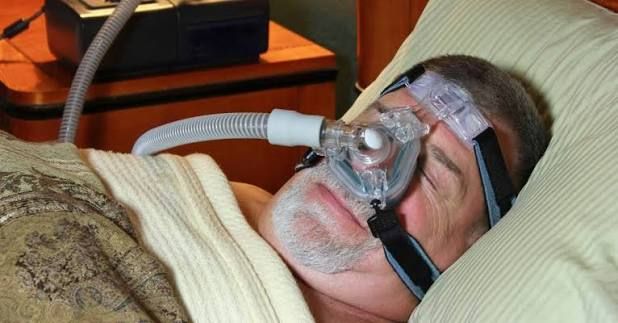
Finding the perfect balance with your cpap heated humidifier requires understanding the difference between relative and absolute humidity. Relative humidity is the amount of moisture in the air compared to the maximum amount the air can hold at that specific temperature. Warm air can hold significantly more water vapor than cold air. Therefore, if your CPAP air is cold, it cannot hold enough moisture to keep your mouth and nasal membranes comfortable, regardless of how much water is in your tub.
This biological bottleneck is why a standard, unheated “pass-over” humidifier often falls short during the colder winter months. In a pass-over setup, air simply blows over room-temperature water. While this provides some moisture, it cannot compete with a cpap heated humidifier. By heating the water, the system dramatically increases evaporation, packing the pressurized air stream with healthy moisture that matches your body’s internal requirements.
To systematically eliminate combating CPAP dry mouth, you must balance three interconnected factors: your machine’s humidifier setting, your tube temperature, and your room’s ambient temperature.
— Team Mind Body Dan
How to Dial In Your Optimal Humidifier Settings
If you have an automatic CPAP machine, it likely has an “Auto” mode that monitors room temperature and humidity, adjusting the optimal humidifier settings in real time. However, many users find that the factory default “Auto” settings do not deliver enough moisture to prevent dryness. If this matches your experience, switch your device to “Manual” mode and follow this calibration strategy:
- Step 1: Increase Humidity Increments. If you wake up dry, raise your humidifier setting by one level. Sleep with this adjustment for two consecutive nights to allow your upper airway tissues to acclimatize.
- Step 2: Coordinate the Tube Temp. As you raise your humidity output, you must increase your heated tube temperature to prevent condensation. A good rule of thumb is to raise the tube temperature by 2 degrees for every level you increase the humidity.
- Step 3: Analyze the Ambient Environment. If your bedroom is particularly cold (below 65°F), the cold ambient air cooling the outside of your CPAP hose increases the risk of rainout. Consider using a hose cover or slightly warming your room to stabilize the relative humidity.
Pro Tip: Selecting the Right Mask to Save Moisture
If you continue to experience dry mouth despite turning your sleep apnea humidifier settings to the maximum, your mask style may be the culprit. Nasal cushions and nasal pillows are highly comfortable, but if your mouth drops open during sleep, the pressurized air rushes down your nose and out your mouth, resulting in extreme dryness. Switching to a Full-Face Mask keeps the humidified air sealed inside both your airway entry points, ensuring your mouth remains moist all night long.
By mastering these adjustments, you can stop waking up to uncomfortable dry sensations. In the final section, we will explore how tracking your sleep architecture and cardiovascular health metrics using screen-free, clinical-grade wearables provides the feedback loop you need to optimize your therapy long-term.
Tracking Your Recovery: Bridging CPAP Optimization with Screen-Free Biometrics
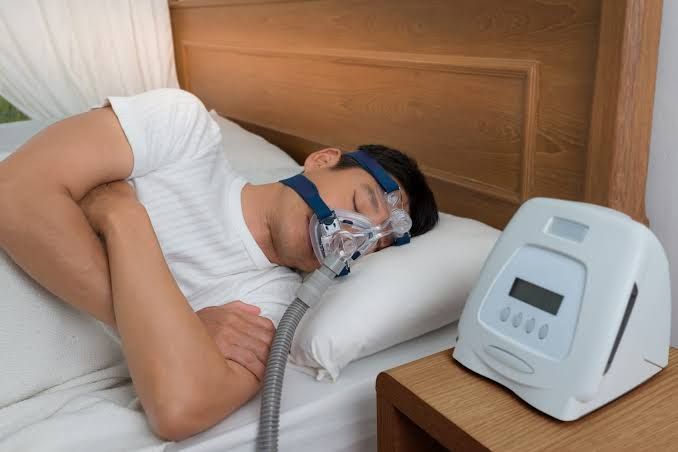
When you are adjusting your cpap humidifier settings to resolve issues like dry mouth, you are not just trying to avoid discomfort—you are attempting to optimize your biological recovery. True recovery is reflected in your sleep architecture (the time spent in Deep and REM sleep stages) and the balance of your autonomic nervous system (measured via Heart Rate Variability, or HRV). When your airway is properly hydrated and free of leaks, your body stays in a restful parasympathetic state. This lowers your sleeping heart rate and raises your HRV, signaling deep restorative rest.
However, many people make the mistake of tracking these metrics using traditional smartwatches. These devices can present multiple problems for CPAP users:
- The Screen Distraction: The blue light and notifications from a smart wrist display can trigger a racing mind and cause 3 AM awakenings, undermining your sleep hygiene.
- Operational Discomfort: Sleeping with a bulky, heavy smartwatch alongside a CPAP mask and headgear can be physically awkward and uncomfortable.
- Battery Fatigue: Daily charging requirements mean trackers often sit on the charger when you need them most—overnight.
- Subscription Burnout: Many health platforms gate your recovery data behind monthly subscription fees, charging you repeatedly for access to your own physical metrics.
The Elegant, Screen-Free Alternative: Herz P1 Smart Ring
The Herz P1 Smart Ring offers a refined solution for tracking your sleep and recovery. Crafted from premium, ultra-lightweight titanium, this screen-free ring slides comfortably onto your finger and tracks your biometrics without bulky screens or constant glowing lights.
Using medical-grade biometric sensors, the Herz P1 tracks Sleep Stages (Deep, REM, Light) and HRV to calculate a simple, actionable Recovery Score. Best of all, it features a subscription-free model—allowing you to monitor your health trends with no hidden monthly costs.
When you optimize your sleep apnea humidifier guide configurations, you should see a direct improvement in your biometrics. By reviewing your trends on a screen-free device like the Herz P1, you can track physical improvements over time:
- An Increase in Deep Sleep: Deep sleep is vital for tissue repair and immune recovery. Proper humidification prevents dry mouth-induced micro-arousals, keeping you in deep sleep stages longer.
- Stabilized HRV: Heart Rate Variability is a powerful indicator of stress. A dry, irritated airway triggers autonomic stress that lowers HRV. Resolving dry mouth allows your HRV to rise, reflecting a resilient nervous system.
- A Better Daily Recovery Score: The Herz P1 processes complex algorithms to present your biometrics in a single, simple score. If your score rises after adjusting your cpap humidifier, you have clear proof that your adjustments are working.
Frequently Asked Questions (FAQ)
How do I stop my mouth from drying out when using a CPAP?
First, optimize your cpap humidifier and consider using a heated tube to prevent moisture loss. Second, check for mouth leaks. If you use a nasal mask and breathe through your mouth at night, dry mouth is inevitable. Using a chin strap, mouth tape, or switching to a full-face mask can help resolve this issue.
Why does my CPAP run out of water during the night?
If your room is cold and dry, your machine must work harder to warm and humidify the air, consuming water more quickly. You can address this by lowering your humidifier setting slightly, using a room humidifier to boost ambient humidity, or using a heated tube to keep moisture suspended in the air stream more efficiently.
Can I use tap water in my CPAP humidifier?
While tap water will not damage your body immediately in an emergency, it is not recommended. Tap water contains minerals that leave hard scale deposits on the humidifier’s heating plate over time. This mineral buildup reduces heating efficiency and can create a porous surface where bacteria and mold can grow. Always use distilled water for safety and longevity.
What is CPAP rainout and how do I prevent it?
Rainout occurs when warm, moist air from your humidifier cools down as it travels through the tube, causing water vapor to condense into droplets. You can prevent this by using a heated tube, wrapping your tube in a fleece cover, or lowering your humidifier setting.
How often should I clean my CPAP water chamber?
You should empty and rinse your water chamber daily with distilled water to prevent mineral buildup and bacterial growth. Once a week, wash the chamber thoroughly with warm water and mild soap, or soak it in a solution of one part white vinegar to five parts water for 30 minutes, then rinse completely.
Will a heated tube help with dry mouth?
Yes. A heated tube keeps the air warm as it travels from your water chamber to your mask. Warm air can carry more moisture than cold air, ensuring that the humidified air reaches your airway without condensing inside the tube.
The Path to Comfortable CPAP Therapy
Managing sleep apnea does not have to mean accepting dry mouth and disrupted rest. By optimizing your cpap humidifier settings, ensuring a proper mask seal, and tracking your physical recovery with a screen-free device like the Herz P1 Smart Ring, you can ensure your therapy is both comfortable and effective.
Disclaimer: Results may vary depending on individual physical activity levels, unique health conditions, and daily tracking patterns. This content is for informational purposes only and does not constitute medical advice. Please consult your physician or sleep specialist for clinical guidance regarding sleep apnea therapy.
